
Aaavatar
Aaavatar is a free macOS app that gives an entire team one consistent portrait style. Drop in photos, and it removes backgrounds with on-device AI, aligns every face identically, then exports LinkedIn, Slack and email crops.
What is Aaavatar?
Aaavatar is a native macOS application that solves one narrow problem thoroughly: making every portrait in a team look as though it were shot on the same day, in the same studio. Its tagline, one look for every team portrait, is also its entire specification.
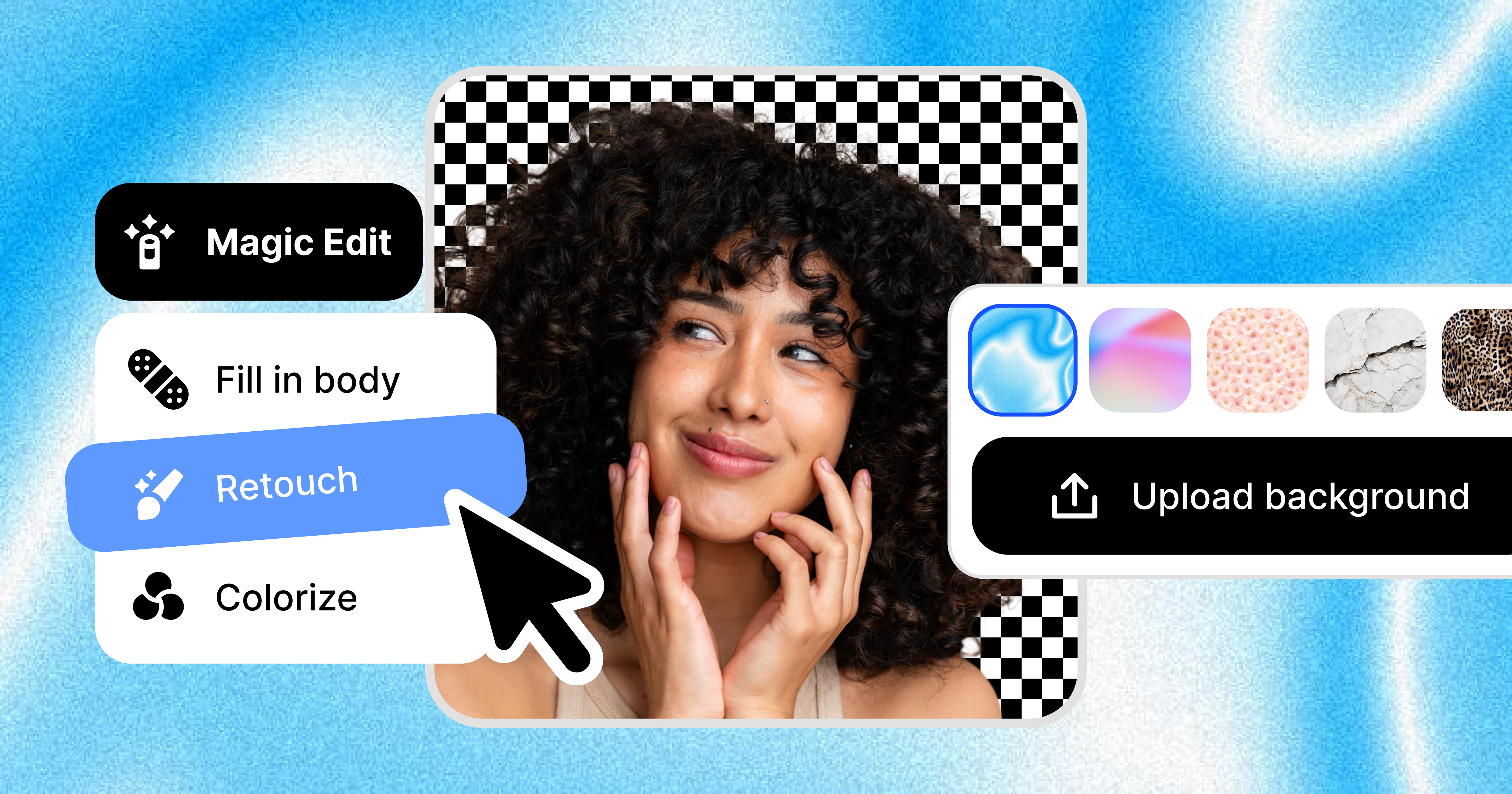
The workflow has three moves. You drop photographs of your colleagues onto the window and the background is removed automatically. You pick a backdrop, either a supplied preset, your brand colour, or an image of your own. A single click then retouches the result, filling in missing shoulders and polishing the shot before export.
What makes the output consistent is the alignment rather than the cut-out. The app calls Apple's Vision framework to lift the subject away from its background, detects the face, and repositions the cut-out so the head occupies 38% of the canvas height, centred at 50% horizontally and 42% vertically. Every portrait lands on the same grid whatever the original composition. A matting model derived from ORMBG, converted to CoreML and shipped with the app, does the separation work; version 1.2 added a linear-sRGB pipeline and an extended hair zone.
Export is preset-driven: LinkedIn at 400×400 in a circle, Slack at 512×512 square, email at 256×256 circular, plus generic squares at 1024, 512 and 256 pixels. You can add your own presets and write several formats at once into a chosen folder.
Everything runs locally. There is no backend, no analytics and no crash reporting, and images stay in the app's own store on your Mac. Collaboration is optional and deliberately indirect: signing in with Google creates an Avatar Workspace folder inside your own Drive, and colleagues you invite receive Drive permissions rather than accounts with the publisher.
The application ships as a notarised disk image from GitHub, updates itself through the Sparkle framework, and needs macOS 14 Sonoma or newer. It is published by Square One, a Dutch design studio, and the current version is free. Two version-one limits are stated openly: no batch import, and no undo or redo.
What it does
- Remove the background from a portrait automatically, on the Mac itself
- Detect the face and align every portrait to the same canonical framing
- Apply a backdrop: a built-in preset, a brand colour, or an image you upload
- Fill in missing shoulders and polish the shot before export
- Export to several presets at once for LinkedIn, Slack, email and generic sizes
- Adjust the framing by hand by dragging, scaling or switching the background
- Share a portrait library through a Google Drive workspace and invite colleagues
When to use Aaavatar / When not to
A quick filter to help you decide if Aaavatar is the right fit.
When to use Aaavatar
- HR and people teams keeping employee portraits consistent across an intranet, a staff directory and a careers page
- Brand and design teams that maintain a visual identity and want every team photo to sit on the same grid
- Communications and PR staff assembling press kits or leadership pages from photos shot on different days
- Small companies and startups with no photographer, turning ordinary phone pictures into presentable headshots
- Mac-based teams already working inside Google Drive who want a shared portrait library without another vendor account
When not to use Aaavatar
- Windows and Linux users: the application runs only on macOS 14 Sonoma or newer, with no web or mobile client
- Teams that need to process hundreds of photos in one pass, since batch import is documented as missing from version 1
- Developers looking for an API or automation hooks, as none is published
- Organisations that require a signed data processing agreement or a security certification before adopting a tool
- Photographers wanting full retouching control, since the app applies one fixed framing and a small set of adjustments
How to use Aaavatar
A typical end-to-end flow, from setup to results.
- Download the disk image from the Download for Mac button on the homepage
- Install it on a Mac running macOS 14 Sonoma or newer
- Drag your team's photographs onto the window, or add them with the + button
- Let the app remove each background and locate each face
- Choose a backdrop: a built-in preset, your brand colour, or an image you upload
- Fine-tune by hand if needed, dragging, scaling or switching the background
- Check the automatic alignment, which places every head on the same grid
- Pick one or several export presets and a destination folder
- Export in a single click; the PNG files are written to that folder
- Optionally sign in with Google to create a shared workspace in your Drive and invite colleagues
Pros & Cons
Pros
- Free in its current version, with no account required for the core workflow
- Entirely local processing: no publisher backend, no analytics, no crash reporting, no advertising SDK
- You keep ownership of every file, and the publisher never receives a copy
- Consistency comes from a fixed alignment rule rather than the operator's eye
- Ready-made presets for the places portraits actually end up, and room to add your own
- Collaboration without a vendor account, since the shared library lives in your own Drive
- EU publisher, Dutch law, a named supervisory authority and detailed dated legal pages for a tool this small
Cons
- macOS 14 or newer only, with no Windows, Linux, web or mobile version
- No batch import and no undo or redo, both documented as absent from version 1
- Collaboration requires a Google account and a broad read/write Drive scope
- No API and no developer documentation
- No published data processing agreement and no security certification, which will stall some procurement reviews
- No dedicated support channel: a single generic address at the publisher answers everything
- The free price is not guaranteed, as the terms reserve the right to introduce paid tiers
Pricing & Plans
Aaavatar is free. The terms state that the current version is provided free of charge, and the site publishes no price, no plan and no paid tier, so there is no cheapest paid entry point to quote and no free trial to speak of, the whole product being free. The publisher reserves the right to introduce paid features or subscription tiers later, which would be clearly identified and would apply only after an explicit opt-in.
Data, GDPR & hosting
A consolidated view of how Aaavatar handles your data.
GDPR overview
The GDPR is addressed directly rather than in passing. The privacy policy, effective 20 April 2026, devotes a section to rights in the European Economic Area: access to the personal data held (the Google email, name and profile picture cached locally), correction or deletion by signing out, withdrawal of consent through Google account permissions, and complaint to a supervisory authority, with the Dutch Autoriteit Persoonsgegevens named explicitly. Because Square One operates no server-side storage, it states that most requests are resolved by signing out and revoking Drive access. The terms add that users must have a lawful basis before processing images of people. The publisher is established in the Netherlands under Dutch law, so no Article 27 representative applies. No data processing agreement is published, and compliance is never claimed in those words.
Who owns the data?
The terms are unambiguous: you remain the owner of every portrait, background and file the application stores, and Square One claims no rights beyond what the features you actively use technically require. There is no backend, so the publisher receives no copy of anything. Images live on your Mac in the app's local store and, if you open a shared workspace, inside a folder you own in your own Google Drive. Google therefore sees the files you sync and your sign-in profile; GitHub sees only an IP address during update checks; collaborators see exactly what you grant them through Drive permissions, which you can revoke.
Reuse rights
Nothing in the terms restricts what you do with the exported portraits. They are your files, written as PNGs to a folder you choose, and no permission is needed to publish or reuse them, including commercially. The obligations run the other way. You must hold the rights to the images and likenesses you import, and you must have a lawful GDPR basis for processing photographs of people. You may not resell, sublicense, rent or lease the application, reverse-engineer it, or use it to build a competing product or to train a machine-learning model without written permission. Backing up your own material is your responsibility, not the publisher's.
Data retention & training
Hosting summary
There is no vendor-side hosting to describe, and that is the point. Square One runs no backend and states plainly that it collects no data on its servers. Imported portraits, AI cut-outs, backgrounds, export presets and app preferences are stored locally on the Mac through Apple's SwiftData framework. If you open a shared workspace, files move into a folder you own inside your own Google Drive — an Avatar Workspace directory holding a workspace descriptor plus portrait and background packages — so the jurisdiction that applies is the one governing your Google account, not the publisher's. OAuth tokens sit in the macOS Keychain and never leave the machine. The privacy policy notes that authentication and Drive storage run on Google's infrastructure, which may process data internationally under Google's own terms, and that GitHub may log an IP address when the app checks for updates. No hosting country or region is declared for user data, because the publisher holds none. The marketing site itself resolves to an Amsterdam CDN node, which says nothing about where anything is stored.
Things to keep in mind
Risks and trade-offs to weigh before adopting Aaavatar.
- You are processing photographs of identifiable people, and the terms put the burden of a lawful GDPR basis, including your colleagues' consent, entirely on you
- Shared workspaces require a broad read and write Google Drive scope, even though the app states it only touches its own workspace folders
- Portraits shared through Drive are only as safe as the Google account holding them and the permissions granted to the people you invite
- The publisher operates no backup infrastructure, so losing the Drive folder means losing the library
- Free today is not free forever: paid features and subscription tiers are explicitly reserved for the future
- No guarantee is given on the quality of the cut-out, so difficult hair, glasses or busy backgrounds may still need manual work
- Forcing every face onto one fixed grid buys consistency at the cost of individuality, and can make a team page look interchangeable
Setup & Integrations
Technical difficulty
Very low. You download a disk image, drag the application across, and open it: no account, no API key, no server settings. The only prerequisite is macOS 14 Sonoma or newer. First use is a drag-and-drop, with background removal and face alignment happening without configuration. The one step deserving attention is signing in with Google to create a shared workspace, which asks for a read and write Drive scope and may need administrator approval in a managed workspace. Since the app is distributed outside the Mac App Store, the first launch relies on Apple's notarisation check.
Deployment
Integrations
Behind Aaavatar
Social
Resources
All the official URLs gathered for verification and reference.
Frequently asked questions
Which platforms does Aaavatar run on?
How much does it cost?
Do my photos leave my Mac?
What is the Google sign-in for?
Who owns the portraits it produces?
Which export formats are included?
Can it process a whole folder of photos at once?
How do I delete my data?
Are my images used to train AI models?
Should you pick Aaavatar?
Aaavatar does one thing and does it without ceremony: it takes a pile of mismatched employee photographs and returns a set of portraits that look like a series. The clever part is not the background removal, which is now commodity work handled by Apple's own Vision framework, but the alignment rule that places every face at the same height and the same centre. Consistency stops being a matter of an operator's patience and becomes a property of the software.
The privacy posture is unusually clean for this category. There is no backend, no analytics, no crash reporting and no advertising SDK, and the publisher states plainly that it never receives a copy of anything. Collaboration, when you want it, borrows your own Google Drive rather than creating an account somewhere else. For an HR or communications team handling photographs of identifiable colleagues, that architecture removes a whole category of questions, even if it also shifts the GDPR burden squarely onto the user, as the terms make explicit.
The limits are equally clear. This is a macOS 14 application with no web, mobile or Windows counterpart, no API, no batch import and no undo. There is no data processing agreement and no certification, which will end the conversation in some procurement departments. It comes from a Dutch design studio rather than a dedicated software vendor, and it is free today with no commitment that it will stay free.
Seen for what it is — a focused, free, local utility from a small team, actively developed through spring 2026 — it is a genuinely useful replacement for an afternoon of manual work in a design tool. Anyone expecting a platform will be disappointed; anyone with forty portraits and one house style will not.
- Choosing a selection results in a full page refresh.
- Opens in a new window.