
Eagle
Eagle is a desktop asset manager for Windows and macOS that collects, tags, searches and previews design files in one local library. AI search and automated tagging speed up organisation. One-time purchase, no subscription.
What is Eagle?
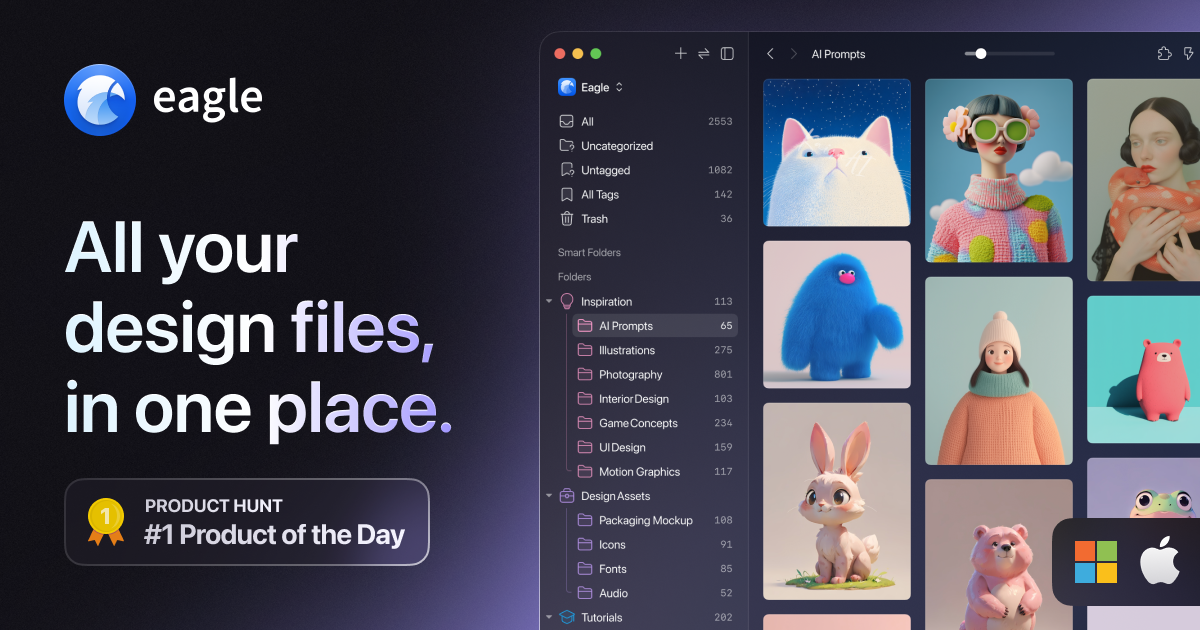
Eagle is a desktop asset manager for Windows and macOS, published by OGDESIGN.INC and sold since 2017. It addresses one specific problem: the reference images, screenshots, mockups, fonts, clips and design files that accumulate across a creative professional's drive until none of them can be found again. Everything the application does is organised around four verbs the vendor puts on its own home page, namely collect, organise, search and browse. Collecting happens mostly through a browser extension for Chrome, Edge, Safari and Firefox. You drag and drop an image, batch-save every asset on a page with filters for size and format, pull down the high-definition version in one click, or use Alt and right-click to get past sites that block downloads. Screen capture and clipboard import cover the rest. Organising is where the library takes shape. Assets go into hierarchical folders and carry tags, while smart folders file things automatically according to rules on name, tag, colour or format. You can annotate directly on an image, add notes, apply star ratings, scan for duplicates and rename in bulk. Searching is the part the vendor claims is fastest, under half a second, and it works by keyword, by colour palette, by multi-dimensional filter, by reverse image lookup, or at random when you want to rediscover forgotten material. Browsing avoids double-clicks entirely, since hovering previews images, GIFs, video, audio and fonts in place. The AI layer sits on top of this rather than replacing it. AI Search adds visual and semantic retrieval, so you can look for an idea instead of a filename. AI Action turns naming conventions, tagging logic and workflow steps into rules a model executes repeatedly. AI Models centralises your credentials for OpenAI, Anthropic Claude, Google Gemini, DeepSeek and Tongyi Qwen, or points at Ollama and LM Studio for local inference, while an MCP and Skill bridge exposes the library to external AI agents. You supply the API key yourself. Two structural choices define the product: the library is stored locally and never uploaded, and the licence is a one-time purchase rather than a subscription.
What it does
- Save images, screenshots and entire web pages in one click
- Organise tens of thousands of assets with tags, folders and rule-based smart folders
- Find a visual by keyword, by colour, by resemblance or by plain-language description
- Preview images, GIFs, video, audio and fonts without opening another application
- Automate renaming, tagging and note-taking with reusable AI-driven rules
- Clean up a library by detecting duplicates, compressing files and converting formats
- Extend the application with plugins or drive it from your own code through the developer API
When to use Eagle / When not to
A quick filter to help you decide if Eagle is the right fit.
When to use Eagle
- Designers and art directors managing thousands of reference images and inspiration boards
- Photographers, video editors and motion designers handling large local media libraries
- Game studios and creative teams keeping assets, design documents and marketing material in one place
- Freelancers and small studios who prefer a one-time licence to a monthly subscription
- Privacy-conscious users who want the library to stay on their own disk, with the option of fully local AI models
When not to use Eagle
- Anyone who needs to work from a phone or tablet, since Eagle has no mobile or tablet application
- Teams looking for a collaborative cloud DAM with permissions, versioning and approval workflows
- Users expecting native cloud sync managed by the vendor rather than assembled from a third-party tool
- Organisations that require a signed DPA, a published subprocessor list or security certifications
- Anyone looking for an image generator, as Eagle organises and lightly edits assets but does not create them
How to use Eagle
A typical end-to-end flow, from setup to results.
- Download the build for your platform: Windows 10 and later, macOS 10.15 and later on Apple Silicon, or macOS 10.13 and later on Intel
- Install it and start the 30-day trial, which unlocks every feature before any payment
- Add the browser extension for Chrome, Edge, Safari or Firefox
- Collect material by drag and drop, by batch-saving a whole page filtered on size and format, by grabbing HD versions in one click, or with Alt and right-click where downloads are blocked
- Organise assets into hierarchical folders, apply tags, and let smart folders sort automatically by name, tag, colour or format
- Annotate and rate: comment directly on an image, attach notes, and star what matters
- Search by keyword, by colour palette, by multi-dimensional filter or by reverse image lookup, and shuffle at random to rediscover material
- For AI features, open Preferences, pick a provider and paste your own API key, or point Eagle at LM Studio or Ollama to run models locally with no key at all
- Install extra plugins from the Plugin Center to add OCR, background removal, upscaling or format conversion
- Buy the licence on the store page through PayPal when the trial ends, one key activating two machines on either operating system
Pros & Cons
Pros
- One-time purchase at USD 34.95 with lifetime updates, so no subscription and no recurring cost
- A complete 30-day trial with every feature unlocked before you pay anything
- The library lives entirely on your own disk, and the publisher states it never uploads your content nor collects imported files
- AI runs on your own API key, keeping model costs under your control, and Ollama or LM Studio keep the whole chain offline
- One licence covers two machines, macOS or Windows interchangeably, with unlimited deactivations
- An open plugin system and public developer APIs, backed by a large catalogue of official plugins
- Actively maintained since 2017, with a versioned release history and a regularly updated development blog
Cons
- No mobile or tablet application, a subject the vendor lists only under future plans
- No native cloud sync, so multi-device use means wiring up a third-party cloud tool yourself
- The publisher is thinly identified: a footer copyright, no postal address, no about page, and both email addresses obfuscated
- Legal documents have not been revised since March 2022, although the product has changed substantially since
- No GDPR claim, no DPA, no Article 27 representative, no published certification and no stated retention period
- Refunds are discretionary, assessed case by case with the final decision reserved to the vendor
- AI features require you to obtain and pay for a third-party API key, and image upscaling expects a dedicated GPU
Pricing & Plans
There is no permanent free plan. Eagle is sold as a single perpetual licence at USD 34.95, paid once, with all future updates included; a 30-day trial of the complete feature set is available beforehand at no charge. The licence covers two devices on either macOS or Windows and includes the browser extension. Payment is taken through PayPal and a coupon field is offered at checkout. The price was raised from USD 29.95 to USD 34.95, an increase of 16 percent announced by the publisher.
- one licence code
- two devices per key
- macOS and Windows
- unlimited deactivations
- browser extension included
- Free 30-day trial
- complete feature set
- no payment required and not a commercial tier
Data, GDPR & hosting
A consolidated view of how Eagle handles your data.
GDPR overview
Eagle never claims GDPR compliance. The only occurrence of the term anywhere on the site is an outbound link to MailChimp's own GDPR resources, so this is silence on the publisher's part rather than a refusal, and that silence is why the record is marked non-compliant. Some building blocks do exist: a data protection officer is named and reachable at services@eagle.cool, and the privacy policy grants rights of access, correction and deletion. But there is no Article 27 EU representative, no data processing agreement, no formal subprocessor page and no published certification. The policy is dated 31 March 2022 and has not been revised since, while the product has gained a plugin system and an entire AI layer in the meantime. One mitigating fact: the library never leaves your computer, so processing is limited to account, support and analytics data.
Who owns the data?
Your library stays yours, and it stays on your machine. Eagle states that the contents of its database are saved on your local hard drive, are not available online, and are never uploaded to the web; the licence agreement adds that Eagle does not collect any source file you import. Separately, OGDESIGN.INC holds account data: name, email, payment and contact details gathered at purchase, through support, the community forum and the newsletter. The publisher states it does not sell, rent or trade personal data, and shares it only with service providers on a need-to-know basis or with authorities where the law requires. You may view, amend or delete it by writing to services@eagle.cool.
Reuse rights
Eagle's policy is written around what the publisher may do with your data rather than what you may do with the material you collect, and it grants no rights over third-party content you save. The stated purposes are narrow: understanding usage to improve the site, troubleshooting and improving the software, answering your requests, and announcing updates and changes. In-app analytics run through Google Analytics and are described as anonymised and non-identifying. Material captured by the browser extension, whether text, images, audio, video or links, is used only to make the application work, and the publisher states it ships no spyware, malware or advertising. Newsletters run on MailChimp, support conversations on HelpScout, and payments on PayPal, which the publisher says it cannot access. One exception deserves attention: the Copy Image Text plugin sends images and text to Google for optical character recognition, a point the publisher flags itself. Nothing anywhere on the site mentions using customer data to train AI models. Whatever you save remains subject to the rights of whoever created it, and Eagle does not clear those rights on your behalf.
Data retention & training
Hosting summary
The publisher declares no hosting country and no hosting region anywhere on the site, which matters less here than it usually would, because the library itself is not hosted at all. Eagle stores its database on your own hard drive, states that this content is not available online, and commits in its licence agreement to not collecting imported source files. What does leave your machine is a narrower set of data handled by named third parties: Google Analytics for anonymised in-app usage, MailChimp for newsletters, HelpScout for support conversations, and PayPal for payments, which the publisher says it cannot access. The Copy Image Text plugin additionally sends images and text to Google for OCR. Where the AI features are concerned, the destination is your choice rather than Eagle's, since data goes to whichever provider you configure and goes nowhere at all if you point the application at a local model through Ollama or LM Studio. The website is served behind Cloudflare, whose anycast address indicates nothing about where anything is actually hosted.
Things to keep in mind
Risks and trade-offs to weigh before adopting Eagle.
- The publisher is hard to identify: a footer copyright, no postal address, no company page, and both email addresses hidden behind obfuscation
- The legal documents date from March 2022 and predate the entire AI layer they are supposed to cover
- No retention period is stated anywhere, and the publisher says anonymised usage data cannot be deleted on request because it cannot be traced back to you
- No GDPR claim, no DPA, no Article 27 representative and no security certification, which is a likely blocker for corporate procurement
- The OCR plugin transmits images and text to Google, a point the publisher flags itself, and the same caution applies to any cloud model you configure
- A local-only library makes backups entirely your responsibility, since a disk failure takes the whole collection with it
- Refunds are assessed case by case with the final decision reserved to the vendor, so the trial period is the real safeguard
Setup & Integrations
Technical difficulty
Low for everyday use. Eagle installs like any desktop application, one build per platform, and drag-and-drop, folders and tags require no technical knowledge. The browser extension is a separate install from your browser's store. The one real hurdle is the AI layer, since you must obtain an API key from a third-party provider and paste it into Preferences. Running models locally through Ollama or LM Studio avoids the key but means setting up a model server. Image upscaling expects a dedicated GPU, and multi-device sync must be assembled yourself with a third-party cloud tool.
Deployment
Integrations
Supported languages
Behind Eagle
Social
Resources
All the official URLs gathered for verification and reference.
Frequently asked questions
Is Eagle a subscription?
How many devices does one licence cover?
Can I try it before buying?
Do my files get uploaded to a server?
Is there a mobile or tablet version?
How do the AI features work?
Which operating systems are supported?
Is there an API?
Can I get a refund?
Is multi-device sync included?
Should you pick Eagle?
Eagle solves an unglamorous problem well: the thousands of reference images, screenshots, mockups, fonts and clips that pile up on a creative professional's drive. Nine years of continuous development show in the product, through a versioned release history, a help centre running to hundreds of articles, a plugin catalogue and public developer APIs. Its commercial position is unusual and, for many buyers, its main appeal: a perpetual licence at USD 34.95 covering two machines, in a market that has largely moved to monthly billing. The AI layer is best understood as an accelerator rather than the product itself. Semantic and visual search, automated tagging and rule-based workflows sit on top of a classic asset manager, and they run on API keys you supply. That design keeps model costs under your control and, with Ollama or LM Studio, allows the whole chain to stay offline, a real advantage for anyone handling client material under confidentiality. The weaknesses are matters of governance rather than engineering. OGDESIGN.INC is identified only by a footer copyright: no postal address, no about page, and both published email addresses hidden behind obfuscation. The privacy policy and licence agreement have not been touched since March 2022, say nothing about GDPR, and set no retention period. There is no DPA, no subprocessor page and no certification. For an individual designer this matters little, since the library never leaves the machine. For a company with a procurement process, it is likely to be the sticking point. Try it before deciding, because the 30-day trial is complete and unrestricted while refunds afterwards are discretionary. Check first that you can work without a mobile app and without vendor-managed sync, then confirm the AI features suit the model provider you already use.
- Choosing a selection results in a full page refresh.
- Opens in a new window.