
Klutch
Klutch is an internal company wiki that pairs long-form Pages with reusable canned Responses, surfaced directly inside Gmail, Slack, Zoom and any text field, and adds GPT-powered email drafting for customer support and sales teams.
What is Klutch?
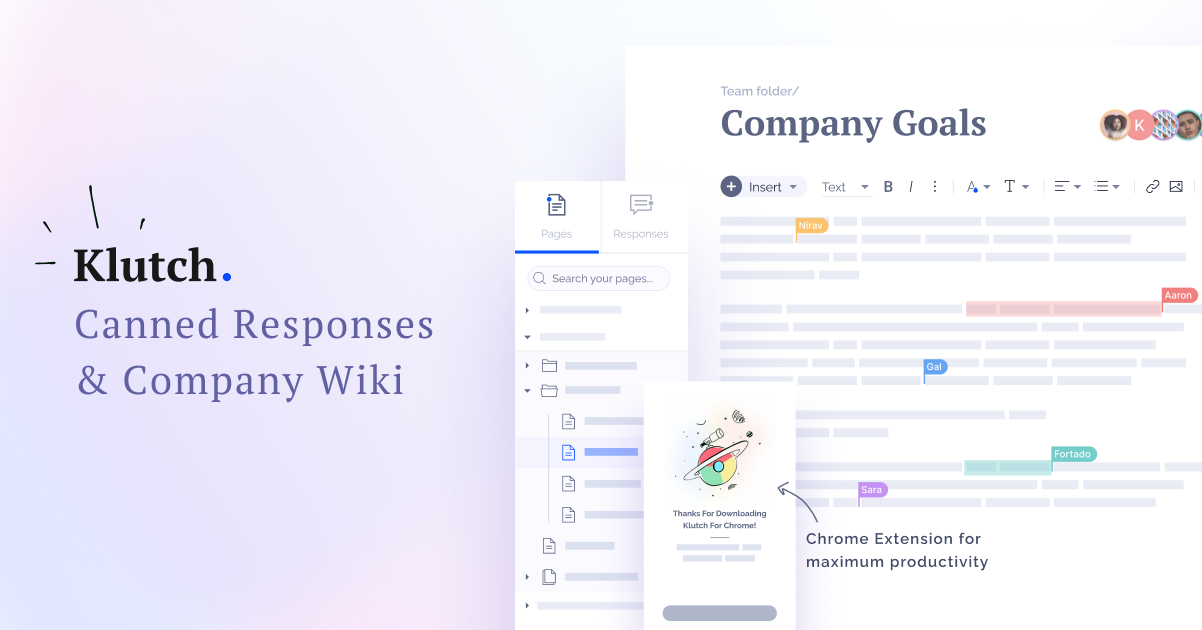
Klutch is a software-as-a-service internal knowledge base published by Klutch Ltd., an Israeli company whose site has been online since April 2021. Its own terms describe it as a SaaS (Software as a Service) tool that allows companies to record company information and use it in customer conversations, and the product rests on two distinct blocks. Responses are short, copy-ready answers that spare a team from retyping the same explanation to customers or colleagues. Pages are longer documents — standard operating procedures, guides, company information — shared with one person, a group or the whole organization.
The tool is designed to be used where the work already happens rather than in a separate tab. Alongside the web application come a Chrome extension and an Edge add-on, compatible with Opera and Brave, plus integrations with Slack, Zoom and Gmail. Saved content drops into any text field, and a right-click on selected text files it as a new response without opening the app. Keyboard shortcuts handle text replacement for the phrases used most often.
The AI layer is real but narrow. Inside the Gmail extension, GPT models reached through the OpenAI API compose and answer emails: the tone can be set to Matching, Casual or Formal, the length adjusted, the draft regenerated, then copied or saved as a reusable response.
Around these functions sit the collaboration features expected of a wiki — real-time editing, comments that notify and can be resolved, and version control with rollback. Content is organized through categories, tags and custom folders, while permissions run per person, per user group or company-wide, with private and shared pages. A template library covers Development/IT, Product and Design, Sales, Marketing, Support and Hiring/PeopleOps, offering ready-made documents such as Job Description, Incident Postmortem, Onboarding Checklist and 1:1 Meeting. Import and export of content are documented in the help center.
Klutch claims more than 3,000 support and sales teams on its home page, and 2,000+ on its pricing page; its Chrome extension is credited with over 3,000 users and 33 reviews.
What it does
- Centralize company pages, procedures and documents in one shared knowledge base
- Create canned responses and reuse them in one click instead of retyping the same answer
- Insert saved content into Gmail, Slack, Zoom or any text field through the browser extension
- Generate and reply to emails with AI directly from Gmail
- Trigger frequently used text with keyboard shortcuts
- Save a new response by right-clicking selected text, without opening the application
- Collaborate in real time, comment on documents and roll back to an earlier version
When to use Klutch / When not to
A quick filter to help you decide if Klutch is the right fit.
When to use Klutch
- Customer support teams that answer the same questions several times a day
- Sales teams that reuse standard messages, scripts and follow-ups
- Small and medium businesses, agencies and distributed teams looking for a simple shared wiki with no technical setup
- HR and people ops staff onboarding new hires with checklists, company overviews and hiring templates
- Operations managers documenting standard operating procedures and internal processes
When not to use Klutch
- Developers who need a public API or programmatic access to their knowledge base, as no API documentation is published
- Teams looking for a customer-facing public help centre, since Klutch is presented as an internal tool
- Organizations with strict security requirements expecting SOC 2, ISO 27001 or a published subprocessor list
- Mobile-first users, because no native iOS or Android application is offered
- Non-English-speaking teams, as the interface, templates and help center are in English only
How to use Klutch
A typical end-to-end flow, from setup to results.
- Create a free account on the Klutch web application with your email, full name and company name, without a credit card
- Install the browser extension from the Chrome Web Store, or the add-on for Edge, which also covers Opera and Brave
- Connect the integrations your team already uses: the Slack workspace, Zoom and Gmail
- Create a first Page from the side menu, then write or paste your company information into the editor
- Start from the template library rather than a blank document whenever a ready-made model fits
- Add Responses in the response editor, or right-click any selected text to file it into a Response category
- Organize everything with categories, tags and folders, then set permissions per person, per user group or company-wide
- Invite team members and assign the Admin or Member role; billing for a seat starts only once the invitation is accepted
- In Gmail, open the AI Emails section of the extension, enter your instruction, click Generate, adjust tone and length, then Copy, Regenerate or Save as a response
- Import existing content and set notification preferences from the Getting Started section of the help center
Pros & Cons
Pros
- Unlimited members on every plan, including the free one, so the price does not follow the size of the team
- Permanent free plan, with no credit card required to start
- Low entry price for the paid tier: 5.00 USD per user per month, or 4.00 USD on annual billing
- An invited member is billed only once the invitation has been accepted
- Knowledge reachable without leaving Gmail, Slack, Zoom or any text field, thanks to the browser extension
- Two complementary blocks, short responses and long pages, where many competing tools cover only one
- No technical setup, a ready-made template library by job function, a structured help center and a 20% discount for non-profit organizations
Cons
- No public API and no developer documentation, which rules out any programmatic integration
- No native mobile application for iOS or Android
- A very tight free plan (10 items, 10 AI replies per month, 2 GB), with quota figures that differ between the pricing grid and the help center
- No published security certification, no named hosting country and no subprocessor list
- No documented option to keep content out of model training
- Legal documents left untouched: terms last updated on 21 October 2021, an undated privacy policy, and the contact page it cites returning a 404
- English-only interface, templates and help center, with a narrow public review base of 33 Chrome Web Store ratings and no social presence linked from the site
Pricing & Plans
Klutch operates on a freemium model with two tiers. A permanent free plan is available at no cost and requires no credit card. The lowest paid entry point is the Pro plan at 5.00 USD per user per month on monthly billing, or 4.00 USD per user per month when billed annually. Subscriptions may be cancelled at any time, and an invited member is charged only once the invitation has been accepted.
- up to 10 items
- 10 AI replies per month
- keyboard shortcuts
- up to 2 GB of storage
- unlimited members
- Chrome and Edge extensions
- access to the integrations
- templates
- unlimited items
- unlimited AI replies
- keyboard shortcuts
- up to 100 GB of storage
- unlimited members
- external sharing
- premium support and everything included in the free plan. Positioned as the way to keep a growing team aligned on a shared knowledge base.
Data, GDPR & hosting
A consolidated view of how Klutch handles your data.
GDPR overview
The privacy policy carries a dedicated GDPR section, but the implementation stops at a handful of concrete commitments. A Data Processing Agreement is supplied on request — Ask us for our DPA (Data Processing Agreement) and we will send it to you via email — and returned signed to contact@klutch.app. Account deletion is available from the interface or by email and is handled within 48 hours. A data protection officer is named, Tomer Aharon, with a postal address in Ashdod, Israel, and a telephone number. Beyond that, the text invokes the Data Protection Act rather than the GDPR when it describes the right of access, no Article 27 representative in the European Union is designated, and the policy shows no effective or last-updated date. Israel benefits from a European Commission adequacy decision, but the site never mentions it.
Who owns the data?
The privacy policy indicates that customers keep their content: You may also create notes and documents, and upload image and/or audio files while using Klutch, while these are stored for your use on Klutch, they are not accessed or used in any way by us. The terms treat that material as User Data uploaded by the customer. Klutch itself collects account details (email, full name, company name, optionally company size and role) and payment information, the latter used only to process transactions. One exception matters: under article 19 of the terms, content pushed through the AI features reaches the OpenAI API, where OpenAI may access it and store it on its own servers.
Reuse rights
Klutch claims no reuse right over customer material. The privacy policy states that notes, documents, images and audio files are stored for the customer's own use and are not accessed by the publisher, and the help center documents content import and export, so a team can take its material back out. On the publisher's side, personal data is used for service delivery, account management and support, usage research and analysis, commercial communication, personalized content and advertising, enforcement of the terms, business administration and transaction processing. IP address, browser type and language, access times, cookies and referring URLs are collected automatically, and web beacons record opens and clicks in promotional emails. Data may be shared with authorized service providers, business partners, Direct Mail Partners, authorities and any acquirer, while aggregated non-personal data may reach advisers, advertisers and investors. Anything submitted to the AI features is processed through the OpenAI API and may be stored there.
Data retention & training
Hosting summary
Klutch publishes almost nothing about where data is hosted. The privacy policy limits itself to saying that the information may be sent to servers located in various countries around the world. No country, no region and no infrastructure provider is named, and a targeted search for AWS, Google Cloud, Azure or any data center reference across the archived pages returned nothing. No subprocessor list is published either: OpenAI is the only third party named, in article 19 of the terms, and only for the AI features. The public website is served behind Cloudflare, on an anycast address announced from AS13335, but that tells nothing about where application data is stored. What is documented is the legal framing: the publisher, Klutch Ltd., is based in Ashdod, Israel, and the terms designate Israeli law and the courts of Tel Aviv. In practice, a buyer with data residency requirements has to put the question to Klutch directly, because the published information does not answer it.
Things to keep in mind
Risks and trade-offs to weigh before adopting Klutch.
- Anything sent to the AI features leaves for the OpenAI API: the terms state plainly Do not share personal or sensitive information as it can be tracked by OpenAI and its third-party collaborators through GPT technology.
- No documented opt-out from model training, so a team cannot knowingly keep its content out of it
- The privacy policy allows the postal mailing list to be shared from time to time with selected providers of goods and services
- No subprocessor list and no named hosting country: where company knowledge physically sits cannot be determined from public information
- No published security certification, which makes an internal compliance review hard to complete on public evidence alone
- Self-service account deletion is not available on a paid plan and has to go through support, while the contact page cited by the privacy policy returns a 404
- Concentrating company knowledge into one convenient tool can erode the habit of documenting properly and leaves a team dependent on a publisher outside the European Union with no Article 27 representative designated
Setup & Integrations
Technical difficulty
Very low. The account is created online in a few fields, with no credit card and no server-side installation, the site stating that no coding is required. The browser extension installs in two clicks from the Chrome Web Store or the Edge add-ons store, and the Slack, Zoom and Gmail integrations are covered by step-by-step help articles, as is importing existing content. Administration stays simple, with two roles, Admin and Member, plus user groups. Since no public API exists, no development work is possible, and none is needed.
Deployment
Integrations
Supported languages
Behind Klutch
Resources
All the official URLs gathered for verification and reference.
Alternatives
Tools that compete with or complement Klutch.
Frequently asked questions
Does Klutch have a free plan?
How much does the Pro plan cost?
When is an invited team member billed?
Which integrations does Klutch offer?
Does Klutch provide an API?
Is there a mobile application?
Which AI powers the email features?
Does my content go to OpenAI?
Can Klutch read the documents I store?
How do I delete my account?
Should you pick Klutch?
Klutch sits in an unusual place, halfway between a team wiki and a text expander, and that combination is its main argument. One tool holds long-form Pages — procedures, guides, onboarding material — and short canned Responses a support or sales agent drops into Gmail, Slack, Zoom or any text field without switching context. For a small or medium team that repeats itself all day, that is a practical answer at a low price: unlimited members on every plan, a permanent free tier with no credit card, and 5.00 USD per user per month for Pro, or 4.00 USD on annual billing, with a 20% discount for non-profit organizations.
The reservations concern transparency more than features. Klutch publishes no security certification, names no hosting country beyond servers located in various countries around the world, discloses no subprocessor list, and documents no way to keep content out of model training. Its AI layer is genuine but narrow, limited to GPT email drafting inside Gmail, and the terms explicitly warn against sending personal or sensitive information through it since OpenAI may store what passes by. The legal paperwork has not moved in four years: terms last updated in October 2021, an undated privacy policy, and a contact page that returns a 404. There is no public API, no native mobile application, and the product is English-only.
The verdict follows from that split. As a shared memory for an English-speaking support or sales team handling everyday operational knowledge, Klutch is inexpensive, quick to deploy and well placed inside the tools people already use. For sensitive company information, a formal compliance review or a programmatic integration, the published evidence is too thin to commit on without asking the publisher direct questions first.
- Choosing a selection results in a full page refresh.
- Opens in a new window.