
99helpers
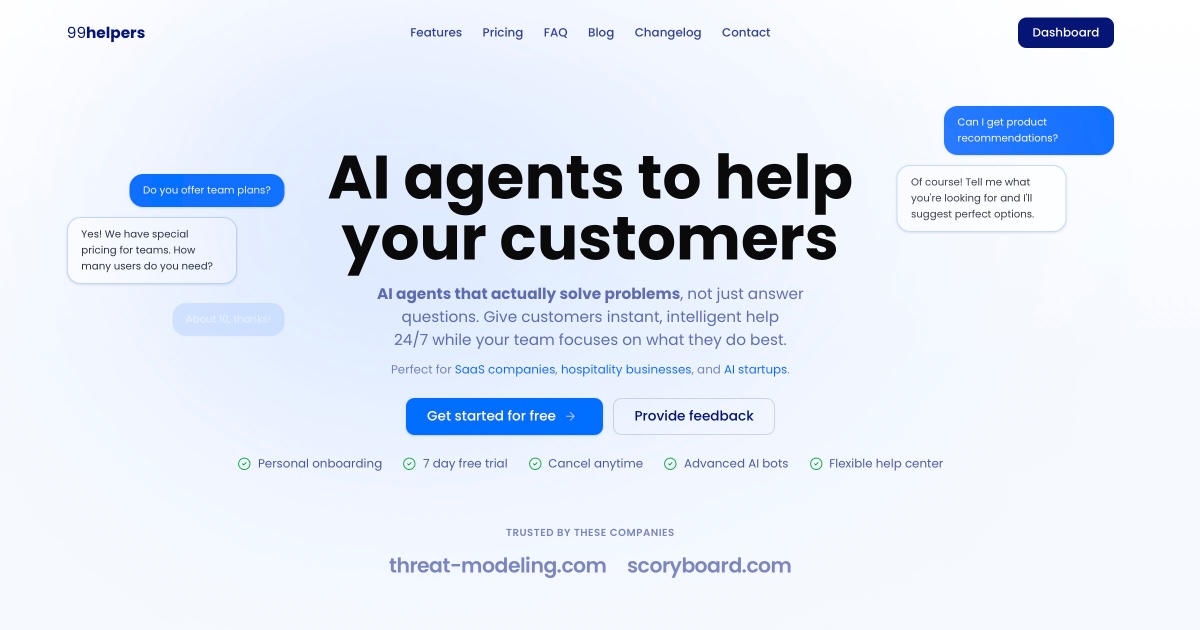
99helpers is an AI customer support platform that combines a chatbot trained on your own content, a searchable help center and a feedback board, all delivered through a single embeddable widget with cited answers.
What is 99helpers?
99helpers packages three customer-facing tools into one subscription and one embeddable widget: an AI chatbot, a help center and a feedback board. The chatbot answers from a knowledge base you assemble yourself, out of four kinds of source — PDF files, whose text is extracted with document structure preserved; individual URLs, fetched by a scraper that strips navigation and advertising; a crawler that walks an entire site within URL patterns you set, respecting robots.txt and deduplicating as it goes; and hand-written question-and-answer pairs that take priority whenever a question matches one of them.
Everything added is chunked, embedded and indexed, so retrieval works on meaning rather than keywords and copes with synonyms and related concepts. Answers carry citations linking back to the source document or page, and the assistant is deliberately confined to the knowledge base: when it finds nothing relevant it says so instead of inventing, which the vendor presents as its main guard against hallucination. Custom instructions set tone, personality and forbidden topics, and up to six clickable starter questions greet each new visitor, some of which can open the help center directly.
The help center is a documentation site in its own right: nested categories, a rich-text editor, optimised images with alt text, internal links that survive URL changes, full-text search with highlighted snippets, and automatic surfacing of popular articles. It runs a draft-then-publish workflow and, importantly, syncs into the chatbot's knowledge base — one body of content feeds both channels instead of two that drift apart.
The feedback center gathers ideas and bug reports through a title-and-description form that needs no account, then organises them with categories, tags, upvotes, internal comments and a status pipeline running from New through Planned to Completed or Won't Fix, notifying whoever submitted or voted when a status changes.
Deployment is one asynchronous embed snippet, framework-agnostic across WordPress, Shopify, Webflow, plain HTML, React and Vue, usable on several domains from a single dashboard, with a built-in test console mirroring production. The legal pages additionally list WhatsApp, Telegram and Facebook Messenger as channels, and an API covering chat completions, knowledge base management, history and analytics is advertised — though no documentation for it is published.
What it does
- Answer customer questions 24/7 from a knowledge base built out of your own content
- Ingest that content from PDFs, single URLs, a full website crawl or hand-written Q&A pairs
- Cite the source behind every answer, with a clickable link back to the original document
- Publish a searchable help center organised into nested categories
- Collect, tag, vote on and track customer feedback through a status pipeline
- Restyle the chat widget to your brand: colours, logo, position, size, greeting, starter questions
- Track conversation volumes, article views and the searches that returned nothing
When to use 99helpers / When not to
A quick filter to help you decide if 99helpers is the right fit.
When to use 99helpers
- Small SaaS and software teams that need round-the-clock answers without hiring a night shift
- Support leads drowning in repetitive questions already answered somewhere in their documentation
- Product managers who want feature requests centralised, voted on and tracked through a status pipeline
- Hospitality, e-commerce and real-estate businesses fielding the same pre-sales questions every day
- Founders and freelancers who need a working help center live in an afternoon on a modest budget
When not to use 99helpers
- Developers who need a documented API: access is advertised but no reference is published anywhere
- Teams that require a native mobile app, for their agents or for their customers
- Enterprises whose procurement demands SOC 2, ISO 27001 or a signed customer-facing DPA
- Organisations that must contractually exclude their data from AI model training
- Companies needing a multilingual interface: no language other than English is declared
How to use 99helpers
A typical end-to-end flow, from setup to results.
- Create an account by email or Google sign-in and start the seven-day trial, no payment card required
- Complete onboarding: business name, website address and how you found the product
- Build the knowledge base — upload PDFs, paste URLs, launch a crawl of your site, write Q&A pairs
- Write the custom instructions that fix the assistant's tone, personality and off-limits topics
- Configure up to six starter questions, routing some of them straight to the help center
- Rehearse in the dashboard test console, checking edge cases and the quality of the answers
- Style the widget: colours, logo, corner, button size, greeting message and visible buttons
- Paste the embed snippet into your site's HTML — one line, loading asynchronously
- Fill the help center with categories and articles, drafting first; the sync to the chatbot is automatic
- Review conversations and failed searches, close the gaps they reveal, and work through the feedback received
Pros & Cons
Pros
- Three products — chat, help center and feedback — in a single subscription and a single widget
- Help center content syncs into the chatbot automatically: one place to maintain, not two
- Answers are cited and confined to your knowledge base, with the bot admitting when it does not know
- Low entry cost: a permanent free plan at USD 0.00 and a paid tier starting at USD 19.00 per month
- Installation is a copy-paste snippet, compatible with WordPress, Shopify, Webflow, React and Vue
- European hosting intent, SCCs for outbound transfers and explicit retention windows of 30 and 90 days
- Personal onboarding call included from the Starter plan upward
Cons
- An API is advertised in the terms and on the features page, but no documentation is published
- No postal address, no registered company name and no legal form appear anywhere on the site
- A single published email address covers legal, GDPR and account security; support runs through the widget
- No security certification (SOC 2, ISO 27001) and no formal subprocessor list
- No documented way to exclude your data from AI model training
- Homepage testimonials are attributed to people and companies that cannot be verified, and one is duplicated
- Very young product: two changelog entries, English-only interface and no mobile app
Pricing & Plans
A permanent free plan is available at USD 0.00 per month, covering a basic AI chatbot, a limited help center and basic support. The lowest paid entry point is the Starter plan at USD 19.00 per month, followed by Pro at USD 49.00 per month, with an Enterprise tier quoted on request. Both paid plans include a seven-day free trial that requires no payment card, and billing is handled monthly or annually through Stripe.
- basic AI chat bot
- limited help center
- basic support
- AI chat bot
- help center
- feedback center
- customer forms
- 1 team member
- personal support
- personal onboarding call
- 7-day free trial
- everything in Starter plus multiple team members
- extended personal support
- advanced help center and feedback center features
- advanced analytics
- option to remove chat bot branding
- 7-day free trial
- all features
- custom features
- influence over the feature roadmap
- advanced enterprise support
Data, GDPR & hosting
A consolidated view of how 99helpers handles your data.
GDPR overview
GDPR implementation here is concrete rather than declarative. The privacy policy, effective 22 March 2026, devotes a section to legal bases and cites them article by article: performance of a contract (Art. 6(1)(b)), legitimate interests (Art. 6(1)(f)), consent (Art. 6(1)(a)) and legal obligation (Art. 6(1)(c)). Data subject rights are listed in full — access, rectification, erasure, restriction, portability, objection, withdrawal of consent and complaint to a supervisory authority — exercisable at nick@99helpers.com with a stated 30-day response time. The vendor says it aims to keep data inside the EEA and covers transfers outside it with Standard Contractual Clauses. What is absent is equally informative: no Article 27 representative, no named DPO, no formal subprocessor list and no certification such as SOC 2 or ISO 27001.
Who owns the data?
Under the terms you keep ownership of everything you upload: documents, help articles, crawled website data and chatbot configurations. 99helpers takes only a limited, non-exclusive, worldwide, royalty-free licence to store, process and use that content, granted solely to provide and improve the Service, with no ownership claim and no other stated purpose. The privacy policy names 99helpers as data controller, reachable at nick@99helpers.com. Conversation and knowledge base content may be passed to AI model providers, Anthropic among them, acting as processors under data processing agreements. One asymmetry deserves attention: any feedback or suggestion you send the vendor is licensed to it perpetually and irrevocably, for any purpose.
Reuse rights
You already own your content, so you may reuse it anywhere without asking permission; nothing in the terms restricts what you do with your own documents, articles or the answers you export. The counterpart is responsibility. You must guarantee that the content breaks no law and infringes no third-party right, and you answer for whatever your chatbot tells your customers — the vendor states plainly that AI-generated content may be inaccurate, incomplete or inappropriate, and that configuring the bot properly is your job. Three limits bind the service rather than the data: you may not use it to build a competing product, you may not resell or sublicense access without written permission, and the free tools are supplied as is for informational and experimental use, explicitly not as professional advice.
Data retention & training
Hosting summary
The vendor describes itself as made in Europe and says it aims to keep data within the EEA where possible. Transfers outside the EEA — explicitly, to AI model providers based in the United States — are covered by Standard Contractual Clauses approved by the European Commission. Hosting is attributed to cloud providers named only as examples, Vercel and Supabase, described as operating in secure, GDPR-compliant environments; Anthropic is cited as a model provider acting as a processor under a data processing agreement, and payments run through Stripe, with no card details stored. Beyond that, precision runs out: no hosting country is named, no datacenter region is specified, and no formal subprocessor list is published — the providers appear as illustrations, introduced by such as. DNS resolution places the site on an anycast node geolocated in the United States, but that is a CDN point of presence and says nothing about where data rests. Claimed security measures are HTTPS in transit, password hashing and access controls, with no certification cited.
Things to keep in mind
Risks and trade-offs to weigh before adopting 99helpers.
- Answer quality is entirely inherited from the knowledge base you supply: a thin one produces confident irrelevance
- You are contractually responsible for what your chatbot tells your customers, and the vendor concedes its output can be wrong
- Visitor conversations are logged, and end users routinely type personal data into a chat box without thinking
- Conversation content reaches third-party model providers, possibly outside the EEA under Standard Contractual Clauses
- No documented training opt-out, and a licence to improve the Service that is never defined
- Automating the front line can quietly degrade support for the complex or distressing cases that most need a human
- Knowledge base, articles and history all live with the vendor, with no documented export path and very little company identity to pursue if things go wrong
Setup & Integrations
Technical difficulty
Low. Installation is a copy-paste embed snippet in your page HTML, loading asynchronously and working with WordPress, Shopify, Webflow, plain HTML, React or Vue without further integration work. The crawler seeds the knowledge base straight from an existing site, so there is no bulk typing. A test console in the dashboard lets you rehearse answers before going live. The real effort is editorial rather than technical: writing, structuring and maintaining the knowledge base is what determines answer quality. A personal onboarding call is included from the Starter plan upward.
Deployment
Integrations
Behind 99helpers
Resources
All the official URLs gathered for verification and reference.
Alternatives
Tools that compete with or complement 99helpers.
Frequently asked questions
How does the AI learn from my content?
Can the chatbot make things up?
Is there a free plan, and how much does it cost afterwards?
How is the widget installed on my site?
How do the help center and the chatbot fit together?
Where is my data hosted and how long is it kept?
Is my data used to train AI models?
Is there an API?
What is the minimum age to use the service?
Which channels besides my website are supported?
Should you pick 99helpers?
99helpers makes a coherent bet: bundle the three things a small support operation actually needs — a chatbot that knows your content, a help center customers can search, and somewhere to collect what they ask for — and price them well below Intercom or Zendesk. At USD 19.00 a month for the entry paid plan, with a genuinely permanent free tier and a seven-day trial that asks for no card, the economics are aimed at teams that would otherwise have nothing at all.
The design choices are sound. Syncing the help center into the chatbot's knowledge base means one body of content rather than two that drift apart. Citations on every answer, and a model confined to the supplied knowledge base, address the failure mode that makes support bots infuriating. Installation is a snippet, and the crawler lets an existing site seed the knowledge base without manual typing.
The reservations concern the vendor rather than the product. No postal address, no registered company name and no legal form appear anywhere on the site, and the single published email address serves legal, GDPR and account-security matters alike. An API is advertised in the terms and on the features page, yet no documentation for it exists across a sitemap of more than a thousand URLs. There is no security certification, no formal subprocessor list, and no documented way to keep your data out of model training. The changelog holds two entries and the domain was re-registered in December 2025: this is a very young product.
For a founder, a freelancer or a small SaaS team wanting a competent support layer live this week, it is a reasonable and inexpensive choice. For anyone whose procurement asks who exactly they are contracting with, the answer is not currently on the site.
- Choosing a selection results in a full page refresh.
- Opens in a new window.