
daisy
daisy is a generative media suite from Liqhtworks, Inc. that lets brands, studios and visual creators generate, edit and animate images and video, and train custom Pods models, all from a web browser with nothing to install.
What is daisy?
daisy is a generative media suite published by Liqhtworks, Inc., a company registered in Middletown, Delaware. Its about page describes a next-gen media company at the edge of the frontier, run by a multidisciplinary team spread across North America, Europe and Asia, and the site sums the product up in a single line: a generative media suite for the defining brands of tomorrow.
The product is organised in three modules. Create is one interface where you generate, edit and animate without changing tab; its inference layer is built on Runware. Image generation is credited to engines such as Flux 2 Max, plain-language editing to FLUX.1 Kontext and Nano Banana Pro, and animation to a choice of three video models — Seedance, Kling and Veo — which the site says all have personalities. Video comes out in 1080p, in 9:16 or 1:1.
Pods are the distinctive piece. A Pod is a custom LoRA-style model trained on four to sixteen of your own images; once trained it produces Shots in one click, with no prompt to write, and Pods can be mixed with one another to obtain hybrid styles. The library already counts hundreds of them, and the terms make the user the owner of the Pods they train, model weights included.
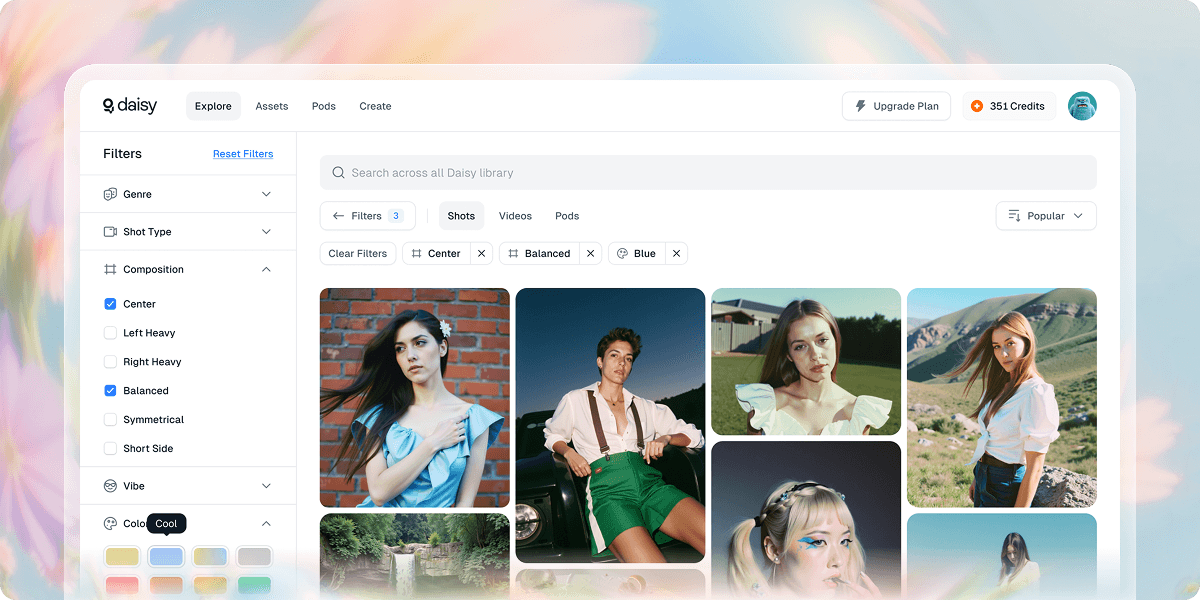
Explore is the community library: Shots, Pods and videos searchable by intent, filtered through style lenses, with generation metadata such as composition, light and camera angle available to inspect and reuse.
Version 1 was announced on 14 July 2025. In May 2026 daisy added SOPHON, an optional video re-encoding pass that cuts file weight by around 44% at equal visual quality, improves mobile time-to-first-frame by 38% and displays a counter of kilowatt-hours saved. Six photo-first mini-applications also derive from the suite: Gemify for jewellery, easyPDP for product detail pages, LinkedInPro for professional portraits, Stitchify for upholstery fabrics, Posterfy for film posters and Dashify for restaurant dishes.
Everything runs in the browser on a credit-based subscription with Free, Starter, Pro and Ultra tiers. Users must be at least 18, and the terms forbid training or generating on subjects under 18.
What it does
- Generate images from a written description, with engines such as Flux 2 Max
- Edit an existing image in plain language through FLUX.1 Kontext or Nano Banana Pro
- Animate a still into 1080p video using Seedance, Kling or Veo, in 9:16 or 1:1
- Train a Pod, a custom LoRA-style model, from four to sixteen of your own images
- Mix several Pods together to obtain hybrid visual styles
- Search a library of Shots, Pods and videos by intent, with style filters and generation metadata
- Compress a video with SOPHON, from a toggle or by dropping in an existing file
When to use daisy / When not to
A quick filter to help you decide if daisy is the right fit.
When to use daisy
- Brand and product designers who need studio-grade visuals of jewellery, furniture or packaging without booking a photo shoot
- E-commerce and merchandising teams producing product detail page imagery at scale, from the studio to the showroom
- Social media and content managers turning frames into reels, photos into carousels and content into campaigns
- Motion designers and visual storytellers who want to animate a still with Seedance, Kling or Veo from a single interface
- Independent photographers, illustrators and emerging creators who can train a Pod on four to sixteen of their own images and keep ownership of the model
When not to use daisy
- Developers who need programmatic access: there is no public API, and the documentation subdomain announced in the navigation returns a 404
- Teams that must budget before committing: no amount is published anywhere on the public site, so pricing only appears after an account is created
- Organisations with strict European data requirements: GDPR compliance is never claimed, no data processing agreement is published and no sub-processor is named
- Mobile-first users hoping for a native application: no iOS or Android app is referenced anywhere
- Anyone under 18 and educators working with minors: the terms set an 18-year minimum and forbid training or generating on subjects under 18
How to use daisy
A typical end-to-end flow, from setup to results.
- Open the daisy web application and create an account — the site invites you to get started for free
- Pick a tier: Free to begin with, then Starter, Pro or Ultra, each bringing a monthly allowance of credits
- In Create, describe the image you want and launch a generation, for example beautiful product detail page photography on a blank white studio backdrop
- Or upload an existing image and rework it in plain language with FLUX.1 Kontext
- Train a Pod by uploading four to sixteen images that represent your visual world
- Mix two or more Pods to obtain a hybrid style
- Animate a visual by choosing a video model — Seedance, Kling or Veo — and a format in 1080p, 9:16 or 1:1
- Turn on the Compress with SOPHON toggle in the generation settings, or drop an existing file into Compress Video
- Browse Explore to find Shots, Pods and prompt metadata you can reuse
- Keep an eye on your allowance: monthly credits do not roll over, and extra credits can be bought at a subscriber discount
Pros & Cons
Pros
- An ownership regime that clearly favours the user: User Content and Generated Content belong to you, Pods included with their model weights, under a perpetual and irrevocable licence
- An explicit commitment not to train on customer data, except for content submitted through an explicit opt-in
- Several leading video models reachable from one interface, with no tool switching
- Pods deliver high-quality output without writing a prompt, from as few as four images
- SOPHON cuts video weight by around 44% with no claimed quality loss, from a single toggle
- A permanent free plan, with a get started for free entry point
- User rights — access, portability, deletion, objection — granted to everyone regardless of location, with a 30-day response time and export available on request
Cons
- No public pricing: amounts only become visible once an account exists, and the in-app pricing API answers with an HTTP 401 without authentication
- GDPR compliance is never claimed, and there is no data processing agreement, no named sub-processor and no certification such as SOC 2 or ISO 27001
- The documentation announced in the navigation is unavailable: the subdomain returns a 404 on every URL tested
- No public API, and no native mobile application referenced
- No contact page and no legal notices: contact details appear only at the end of the privacy policy and the terms of use
- Mandatory arbitration in Los Angeles and a class action waiver, unless you opt out in writing within 30 days
- Monthly credits do not carry over from one month to the next, and no interface language other than English is announced
Pricing & Plans
daisy is offered on a freemium basis: a permanent free plan is available, alongside paid Starter, Pro and Ultra tiers billed monthly or annually, each carrying an allowance of monthly credits that do not roll over. No amount is published. The showcase site has no pricing page, the in-application pricing page is rendered in JavaScript and the pricing API it relies on returns an HTTP 401 without authentication. Consequently no entry price, no currency and no billing unit can be stated here: amounts are only disclosed once an account has been created.
- Free — described in the application as perfect for starters
- no amount published
- Starter — great for beginners and light use
- no amount published
- Pro — best for individuals and small teams
- no amount published
- Ultra — best for mediums size teams
- in the site's own wording
- no amount published
- Each tier carries monthly credits used to train Pods
- generate images and create video
- with a choice of monthly or annual billing
Data, GDPR & hosting
A consolidated view of how daisy handles your data.
GDPR overview
GDPR compliance is never claimed. The term GDPR appears nowhere on the site: the privacy policy is built around the Californian CCPA and CPRA. What is actually stated is narrower but concrete. Section 4.2 grants the same rights to every user regardless of location — access and portability, deletion, objection, restriction and withdrawal of consent — with a stated response time of 30 days. Section 7 states that transfers out of the European Economic Area or the United Kingdom are covered by Standard Contractual Clauses approved by the European Commission, by adequacy decisions or by other appropriate safeguards. Section 12 adds that EU residents may lodge a complaint with their local supervisory authority. Nothing further: no Article 27 EU representative, no data protection officer, no published data processing agreement and no named sub-processors.
Who owns the data?
Under the terms of use you keep every right you already hold in your User Content, and daisy assigns to you whatever rights it may have in the Generated Content. You also own the Pods you train, model weights, architecture and associated data included, under a perpetual and irrevocable licence to use, modify and export them. The licence you grant daisy in return is worldwide, non-exclusive and royalty-free, but limited to operating the service, and it does not extend to training AI models. daisy keeps ownership of its own models, algorithms and software. The publisher is Liqhtworks, Inc.; the third parties it shares data with are described by category only — cloud hosting, payment, analytics, support, security — and never named.
Reuse rights
Yes, and no prior permission has to be requested. The terms state that any image, video or other content generated through the service remains your exclusive property, commercial use included, and that the Pods you train are yours to use, modify and export under a perpetual, irrevocable licence. Deletion can be requested at any time, and an export of your data in a machine-readable format can be obtained by writing to support@daisy.so. The safeguards fall on you: you warrant that you hold the rights to everything you upload, unlawful content, undisclosed deepfakes and infringement of intellectual property or likeness rights are prohibited, and the terms warn that generated content may be inaccurate and must be verified before you rely on it.
Data retention & training
Hosting summary
The publisher, Liqhtworks, Inc., is registered in Delaware and the terms of use place disputes under Californian law. The privacy policy states that data is transferred to and processed in the United States and in other countries where daisy's servers and service providers are located; no hosting country other than the United States is named, and no dedicated European region is offered. Transfers from the European Economic Area or the United Kingdom are covered by Standard Contractual Clauses approved by the European Commission, by adequacy decisions or by other appropriate safeguards. Service providers are listed by category only — cloud hosting and infrastructure, payment processors, analytics and marketing, support tools, security and fraud prevention — with no name given. Security measures announced are encryption in transit and at rest, access controls and authentication, regular security assessments, staff training and incident response procedures, with no absolute guarantee of security. Note that the IP address the domain resolves to is an anycast CDN node and says nothing about where the data itself is stored.
Where daisy works
Country-level availability.
Not available in
Things to keep in mind
Risks and trade-offs to weigh before adopting daisy.
- Generated images and videos can be inaccurate: the terms explicitly ask you to verify them before relying on them
- Commercial use of synthetic visuals carries a real risk of misleading a customer about the actual product, whether a piece of jewellery, a dish or a piece of furniture
- Generated professional portraits can drift noticeably from the real person behind the published picture
- Deepfakes are prohibited without disclosure by the terms, yet the tool makes placing a face into an image technically trivial
- Third-party rights sit with you: training a Pod on images you do not own exposes you personally, and images of people under 18 are prohibited in training as in generation
- Creative dependency: the promise of beauty without the prompt can quietly erode photographic and art-direction craft
- Mandatory arbitration in Los Angeles and a class action waiver apply unless you opt out in writing within 30 days, while non-rolling monthly credits push you to consume so as not to lose your allowance
Setup & Integrations
Technical difficulty
Very low. Nothing is installed: everything happens in the browser, and the only prerequisite is creating an account and signing in. No technical skill is required — the product promise is beauty without the prompt, at the click of a button — and SOPHON compression is enabled by a simple toggle. The only step calling for a little preparation is gathering four to sixteen coherent images to train a Pod. There is no API, no SDK and no local installation to plan for.
Deployment
Integrations
Behind daisy
Social
Resources
All the official URLs gathered for verification and reference.
Frequently asked questions
What is daisy?
What is a Pod?
Which video models are available?
Who owns the images and videos I generate?
Is my content used to train daisy's models?
Is there a free plan, and how much does daisy cost?
Does daisy offer an API or public documentation?
Is there a minimum age?
Where is my data hosted, and how do I delete it?
What is SOPHON?
Should you pick daisy?
daisy is a finished, actively maintained product rather than a demonstration: version 1 shipped in July 2025 and the blog has tracked steady additions since, up to the SOPHON video re-encoder in May 2026.
Its strongest argument is legal as much as technical. The terms of use hand the user an unusually favourable ownership regime: you keep your uploads, daisy assigns you its rights in the generated content, and you own the Pods you train — model weights, architecture and associated data — under a perpetual, irrevocable licence to use, modify and export. That sits on top of an explicit commitment not to train on customer data unless you opt in. Second in line comes the convenience of reaching Seedance, Kling and Veo, plus plain-language editing with FLUX.1 Kontext, from a single interface, with Pods removing the need to write prompts at all.
The reservations are just as clear. Pricing is entirely opaque before sign-up: no amount appears anywhere on the public site and the in-application pricing API answers 401 without authentication, so no budget can be set in advance. Legal maturity is partial: GDPR compliance is never claimed, no data processing agreement is published, no sub-processor is named, no certification is mentioned, and the site has neither a contact page nor legal notices. The documentation subdomain announced in the navigation is entirely offline, there is no public API and no native mobile application.
The tool is worth the detour for brands, studios and visual creators who want a recognisable house style reproduced in one click and who care about owning what they produce. Teams that need to budget upfront, integrate programmatically or document European compliance to a client or a legal department should wait for daisy to publish more.
- Choosing a selection results in a full page refresh.
- Opens in a new window.