
FloorPlan AI
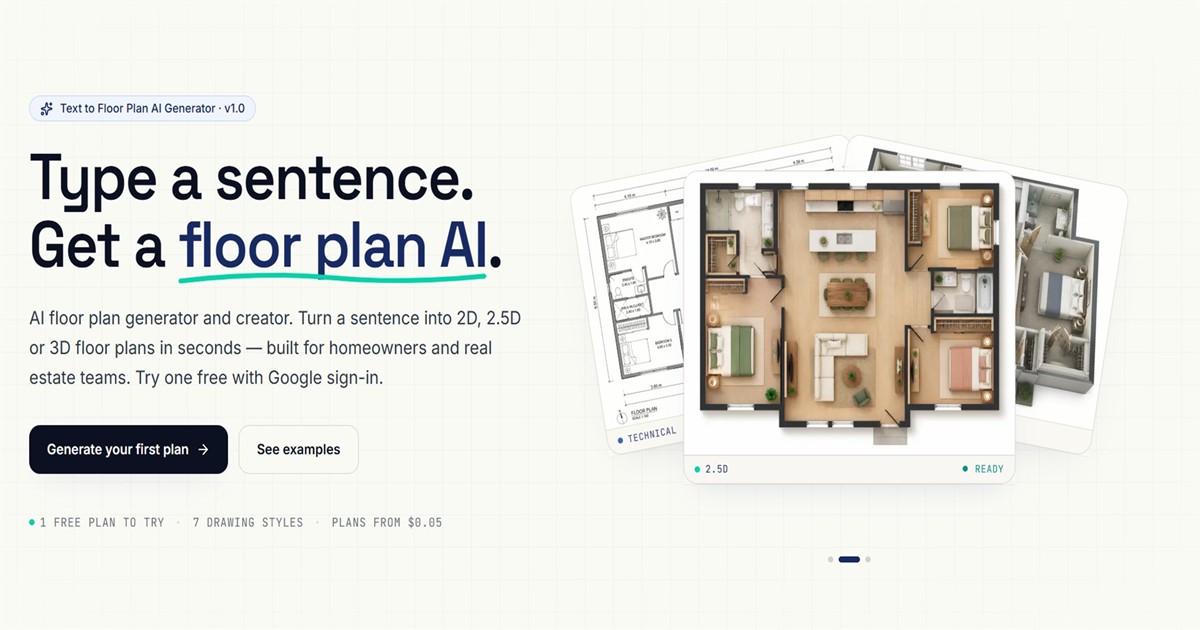
FloorPlan AI turns a plain-English sentence into a top-down 2D floor plan as a PNG, or a downloadable GLB 3D model, in 1K to 4K resolution. Aimed at homeowners, real estate teams, and 3D designers.
What is FloorPlan AI?
FloorPlan AI is a browser-based floor plan generator and 3D model creator, badged v1.0, that turns a sentence of plain English into a drawing. Describe a space, with its number of bedrooms, its style, a floor area in square meters or square feet and any constraints, and the tool returns a top-down 2D plan as a PNG showing walls, doors, windows and labelled rooms, in 20 to 60 seconds. A separate module, still marked Beta, produces a downloadable GLB file in 2 to 3 minutes that rotates and zooms in the browser and opens in Blender, Unity, Unreal Engine, three.js and Apple Vision Pro.
The Features section announces and names seven drawing styles: technical blueprint, watercolor, marker pen, anime, 2.5D, 3D isometric and photorealistic. The pricing cards, however, advertise "All 6 drawing styles", and the site does not resolve the contradiction. Seven interior mood presets sit alongside them: Modern, Scandinavian, Japandi, Mid-Century, Bohemian, Farmhouse and Industrial. An image-to-image mode accepts up to 16 reference photos to restyle a layout while keeping its structure. Output comes at 1K, 2K or 4K, costing 1, 3 and 6 credits respectively; a 3D model costs 10 credits, with mesh density running from Draft at 40,000 faces to Ultra at 1.5 million faces.
The privacy policy names the underlying models: gpt-image-2 from OpenAI, served through KIE.ai with Replicate as a fallback, for the 2D side, and Tencent Hunyuan-3D 3.1 through Replicate for the 3D side. Access requires a Google OAuth sign-in, no password being stored, and one free credit is granted on registration.
Three audiences are addressed: homeowners, real estate teams, and 3D designers and indie creators. A dedicated page covers workplaces of 5 to 500 desks, with meeting rooms, phone booths, breakout areas, a kitchenette, a reception and optional dimensions.
The publisher describes itself only as an independent sole proprietorship and is not named; the domain was registered on May 9, 2026 and first captured by the Wayback Machine on June 11, 2026. Three gaps are acknowledged as roadmap items rather than features: there is no plan editor, no PDF, DWG or CAD export, and no public API.
What it does
- Generate a top-down 2D floor plan from one plain-English sentence, in 20 to 60 seconds
- Generate a downloadable GLB 3D model of the same space in 2 to 3 minutes, rotatable and zoomable in the browser
- Restyle an existing layout from up to 16 reference images while keeping its structure
- Apply one of the drawing styles named on the site and one of the 7 interior mood presets
- Output at 1K, 2K or 4K and in Auto, 4:3, 16:9, 1:1, 3:4 or 9:16 ratios
- Lay out an office of 5 to 500 desks with meeting rooms, phone booths, breakout areas, a kitchenette and reception
- Download a high-resolution PNG with no watermark
When to use FloorPlan AI / When not to
A quick filter to help you decide if FloorPlan AI is the right fit.
When to use FloorPlan AI
- Homeowners who want to test five layouts in five minutes before paying an architect's concept fee
- Real estate agents and brokers who need a clean PNG floor plan for a listing
- 3D designers and indie creators who want a GLB model to import into Blender, Unity, Unreal Engine or three.js
- Startup founders and office managers sizing a workplace of 5 to 500 desks, with meeting rooms, phone booths and breakout areas, before signing a lease
- Facilities and space planners replanning a floor after a reorganization without commissioning a draftsman
When not to use FloorPlan AI
- Anyone who needs architect's drawings, construction documents, engineering plans or a permit filing: section 11 of the terms rules all of these out
- Professionals who need reliable dimensions, wall thicknesses, columns or load-bearing elements, which the publisher itself calls unverified and likely inaccurate
- Teams that must demonstrate compliance with egress clearances, ADA accessibility or local building codes, none of which the tool checks
- Users who expect to fine-tune a generated plan: there is no editor, only a fresh paid generation after rewording the prompt
- Studios and developers who need PDF, DWG or CAD export, or a public API: only PNG and GLB exist today, the rest being roadmap
How to use FloorPlan AI
A typical end-to-end flow, from setup to results.
- Sign in with Google in one click: this is required before any generation, and no credit card is asked for the free credit
- Describe the space in one plain-English sentence, for example "Create a floor plan with three bedrooms, a living room, an open kitchen, and two bathrooms..."
- Or use the Template tab instead of writing, with counters for bedrooms, bathrooms and floors
- Or start from a shortcut: Apartment, House, Studio, Tiny house, Office or Restaurant, and on the office page Open-plan startup, Creative agency, Executive suite, Corporate floor, Co-working or Home office
- Add "with dimensions" or a target floor area to the prompt to get annotated dimensions, and state positions such as "near reception" or "along the perimeter", which the generator follows
- Pick a drawing style and an interior mood preset
- Upload up to 16 reference images if you want to restyle an existing sketch, plan or interior photo
- Choose a ratio (Auto, 4:3, 16:9, 1:1, 3:4, 9:16) and a resolution (1K, 2K or 4K)
- Generate the 2D PNG in 20 to 60 seconds, or switch to 3D Visualization for a GLB in 2 to 3 minutes
- Download the high-resolution PNG, watermark-free; to change a detail, refine the prompt and generate again, each run costing 1, 3 or 6 credits
Pros & Cons
Pros
- Immediate to pick up: one sentence is enough, and no CAD skill is involved
- Genuinely free to try after a Google sign-in, with no credit card
- Two outputs from a single prompt, a 2D PNG and a 3D GLB model, which is uncommon at this price
- GLB is a standard format, usable across the usual 3D pipeline, and the 2D output is fast (20 to 60 seconds) and watermark-free
- Unusually complete and dated legal documents for a product of this size: legal bases per purpose, a quantified retention table, nine named subprocessors and a detailed refund policy
- Honest about its own limits: the terms state plainly that the plans are not buildable
- No training on customer data, stated on the home page, on the office page and in section 10.3 of the terms
Cons
- No editing at all: changing one detail means paying for another generation
- PNG and GLB only, with no PDF, no DWG and no CAD export
- No public API: batch generation is advertised as "coming soon" on the Team plan
- Google sign-in is mandatory, with no other authentication method
- The publisher is not identified: no registered company name, no postal address, no named director, an "independent sole proprietorship" declaration only, no social profile, no mobile app, no contact page, and a single email address for support, legal, GDPR, DMCA and arbitration alike
- A very young service, the domain having been registered on May 9, 2026 and first captured by the Wayback Machine on June 11, 2026, with an acknowledged dependency on third parties (KIE.ai, Replicate, OpenAI) whose availability conditions the service under section 3 of the terms
- Inconsistent and incomplete pricing display: the Features section says 7 drawing styles while the pricing cards say 6, the Yearly and One-time amounts are not stated in the served HTML, and plan credits neither roll over nor survive the end of the cycle or a cancellation
Pricing & Plans
A free plan is available. The Free tier is billed at 0 USD and presented as free forever; it grants one credit on registration, 1K output only and a ceiling of 10 credits per day. The lowest paid entry point is the Pro plan at 19.00 USD per month, the Monthly tab being the default view of the pricing grid, and it includes 300 credits per month; the Team plan is 59.00 USD per month for 1,500 credits. A one-time Pro option is also offered at 19 USD for 240 credits with no recurring billing. Yearly billing is advertised with a "Save 20%" label, but no yearly amount is stated in the served HTML. Consumption is metered in credits: 1 credit for a 1K generation, 3 for 2K, 6 for 4K, and 10 credits for a 3D GLB model. Billing is handled by Stripe in USD, exclusive of tax, Stripe Tax adding VAT, GST or sales tax according to the billing address. Section 9 of the terms allows prices to change, with at least 30 days' notice before any increase on an existing subscription.
- 0 USD
- presented as free forever
- 1 credit on registration
- 1K resolution only
- image-to-image with up to 16 references
- PNG download
- 3D models at 10 credits
- capped at 10 credits per day. CTA "Sign in free". The card reads "All 6 drawing styles"
- 19 USD per month
- 300 credits per month
- badged "Most popular". All resolutions 1K/2K/4K
- 3D Visualization unlocked at 10 credits per GLB
- drawing styles plus the 7 interior styles
- image-to-image with 16 references
- GLB download for Blender
- Unity
- 59 USD per month
- 1
- 500 credits per month
- everything in Pro including 3D Visualization
- plus a batch generation API marked "coming soon"
- branded watermark templates and priority support. CTA "Sign in to subscribe".
- 19 USD for 240 credits
- no recurring billing
- credits that never expire.
- a "Save 20%" label is displayed
- but no yearly amount appears in the served HTML.
Data, GDPR & hosting
A consolidated view of how FloorPlan AI handles your data.
GDPR overview
Implementation is explicit and structured, although the site never claims to be GDPR compliant in so many words. The privacy policy, effective June 10, 2026, gives legal bases per purpose for the EEA and the UK: Article 6(1)(b) contract, 6(1)(f) legitimate interest for anti-fraud and aggregated analytics, 6(1)(c) legal obligation and 6(1)(a) consent for marketing. It lists the rights under Articles 15 to 22 and the right to complain to a supervisory authority (EDPB, or the ICO in the UK), promises a reply within 30 days, and commits to breach notification within 72 hours under Articles 33 and 34. Transfers to the United States rely on Standard Contractual Clauses. The controller is the unnamed sole proprietorship, and no Article 27 representative has been appointed: "If we appoint an EU/UK representative under Article 27 GDPR in the future, their details will be published on this page."
Who owns the data?
Under section 10 of the terms, you keep all rights in your Inputs, meaning prompts and reference images, and grant FloorPlanAI and its subprocessors a worldwide, non-exclusive license used only to deliver the service, prevent abuse and comply with the law; it ends when you delete the Input or your account. On the output side, "to the extent we hold any rights in the Outputs we generate for you, we assign those rights to you on creation", subject to your compliance with the terms and with the AI providers' conditions, notably OpenAI's for gpt-image-2. No non-infringement warranty is given. Aggregated, anonymized data derived from Inputs and Outputs may be used to operate and improve the service.
Reuse rights
Outputs can be reused without asking permission: personal, professional and commercial use, resale included, is granted, and commercial use is advertised on the Pro and Team plans. On the collection side, the privacy policy lists the Google account data (name, email, picture, Google ID), prompts, style preset, resolution, reference images, generated images and correspondence, plus technical data such as IP address, user agent, browser language, timestamps, referrer, pages and API endpoints visited, number of generations, credits, tier, success or failure and error codes. Stripe returns the billing event, invoice ID, customer ID, plan purchased and tax country or postal code, never the full card number, the CVC or full bank details. A browser fingerprint is computed client-side by FingerprintJS, but only a salted SHA-256 hash and a random visitor UUID are stored, the raw fingerprint never being transmitted. Prompts and reference images are sent on to the AI subprocessors, while the visitor hash and IP address decide whether the free credit is granted. The publisher states it sells no data and shares none for cross-context behavioral advertising, and uses strictly necessary cookies only (authjs.session-token for 30 days, vid and vid_set for 365 days, Stripe's __stripe_mid and __stripe_sid), with cookieless Vercel analytics and no consent banner, justified by the ePrivacy exemption. OpenAI's Moderation API screens prompts before generation, with a human appeal available by email.
Data retention & training
Hosting summary
Hosting is American. Section 8 of the privacy policy states that the infrastructure and most subprocessors sit in the United States, and that data belonging to users outside the US is transferred there. Section 7 names the providers: Neon, Inc. for the managed PostgreSQL database, described as "USA (configurable)"; Vercel, Inc. for web hosting, CDN and cookieless aggregated analytics, described as "USA & global edge"; and Cloudflare, Inc. for email routing and R2 object storage holding the generated plans and models. The database is encrypted at rest, managed by Neon, and HTTPS with TLS 1.2 or above plus HSTS is applied throughout, under section 11. Transfers from the EEA, the UK and Switzerland rely on Standard Contractual Clauses, module 2 or 3. The policy names countries rather than normalized hosting regions, so no region beyond the United States is claimed here.
Where FloorPlan AI works
Country-level availability.
Not available in
Things to keep in mind
Risks and trade-offs to weigh before adopting FloorPlan AI.
- Never build, demolish, renovate, file for a permit or buy a property on the strength of an output: section 11 of the terms requires review by a licensed architect, engineer, contractor and surveyor first
- Dimensions, load-bearing walls and compliance items such as egress, ventilation and ADA accessibility are called unverified and likely to be inaccurate or non-compliant by the publisher itself; the real risk is human, namely trusting a clean-looking drawing and quietly stopping to check it against reality
- Section 24 imposes individual AAA arbitration in Delaware and a class action waiver, with only 30 days to opt out by email, and section 23 makes Delaware law applicable
- Liability is capped at the higher of the amounts paid over the previous 12 months and 100 USD, under section 16
- Plan credits and top-up credits are both lost on cancellation except where a refund applies (section 19), and a chargeback opened without contacting support first can lead to immediate suspension, loss of credits and a ban (refund policy, section 10)
- Prompts are screened by automated moderation before generation; a blocked prompt is refused before any charge, so what you write is reviewed by a machine as a matter of course
- The publisher is unidentified, with no registered company name, no address and no named director, and a single email address, hello@floorplanai.net, is the only channel for support, legal, GDPR and arbitration matters
Setup & Integrations
Technical difficulty
Very low. There is nothing to install, this being a pure web application. A single step stands between a new visitor and a first generation, a one-click Google OAuth sign-in, and no credit card is needed to try it. No CAD software and no learning curve are involved, as the site repeats. The only real prerequisite is being able to phrase a prompt in English. The one exception is the 3D side: using a GLB file beyond the in-browser viewer requires a third-party tool able to open it.
Deployment
Integrations
Supported languages
Behind FloorPlan AI
Resources
All the official URLs gathered for verification and reference.
Frequently asked questions
What is FloorPlan AI?
How accurate are the plans?
Can I edit a generated plan?
Which download formats are available?
Do you train your models on my floor plans?
Is there an API for batch generation?
How many desks can the office generator handle?
Can the plans show dimensions?
Are the plans buildable?
What are the age limits and the refund rules?
Should you pick FloorPlan AI?
FloorPlan AI is a very young product, the domain having been registered on May 9, 2026 and the Wayback Machine having first captured the site on June 11, 2026, yet it is already complete within the scope it claims. That scope is narrow and openly stated: concept and communication, never execution. The terms say so themselves, in a section that rules out architect's drawings, construction documents, engineering studies and permit filings, and that describes dimensions, wall thicknesses and load-bearing elements as unverified and likely to be inaccurate. Read that way, the tool is honest rather than disappointing.
What it does well is turn a sentence into something you can show: a clean top-down PNG in under a minute and, from the same prompt, a GLB model that opens in Blender, Unity, Unreal Engine, three.js or Apple Vision Pro. Commercial use is included from the Pro tier at 19 USD per month, and a one-time option at 19 USD for 240 credits avoids a subscription altogether. The legal documentation is unusually thorough for a product of this size.
The main caution concerns the publisher itself. FloorPlanAI is presented as an independent sole proprietorship, with no registered company name, no postal address and no named director, and a single email address carries support, legal, GDPR and arbitration matters alike. That is a fact to weigh, not a verdict.
Three absences complete the picture: there is no plan editor, so every change is a new paid generation; there is no PDF, DWG or CAD export; and there is no public API. All three are announced as roadmap items. If your need stops at a convincing concept image, the fit is good. If it begins where a builder begins, it is not.
- Choosing a selection results in a full page refresh.
- Opens in a new window.