
PopTask
PopTask is an AI to-do list for Mac, iPhone and iPad. Type or dictate a task in shorthand and it works out the title, date, time and recurrence, then syncs with Apple and Google calendars.
What is PopTask?
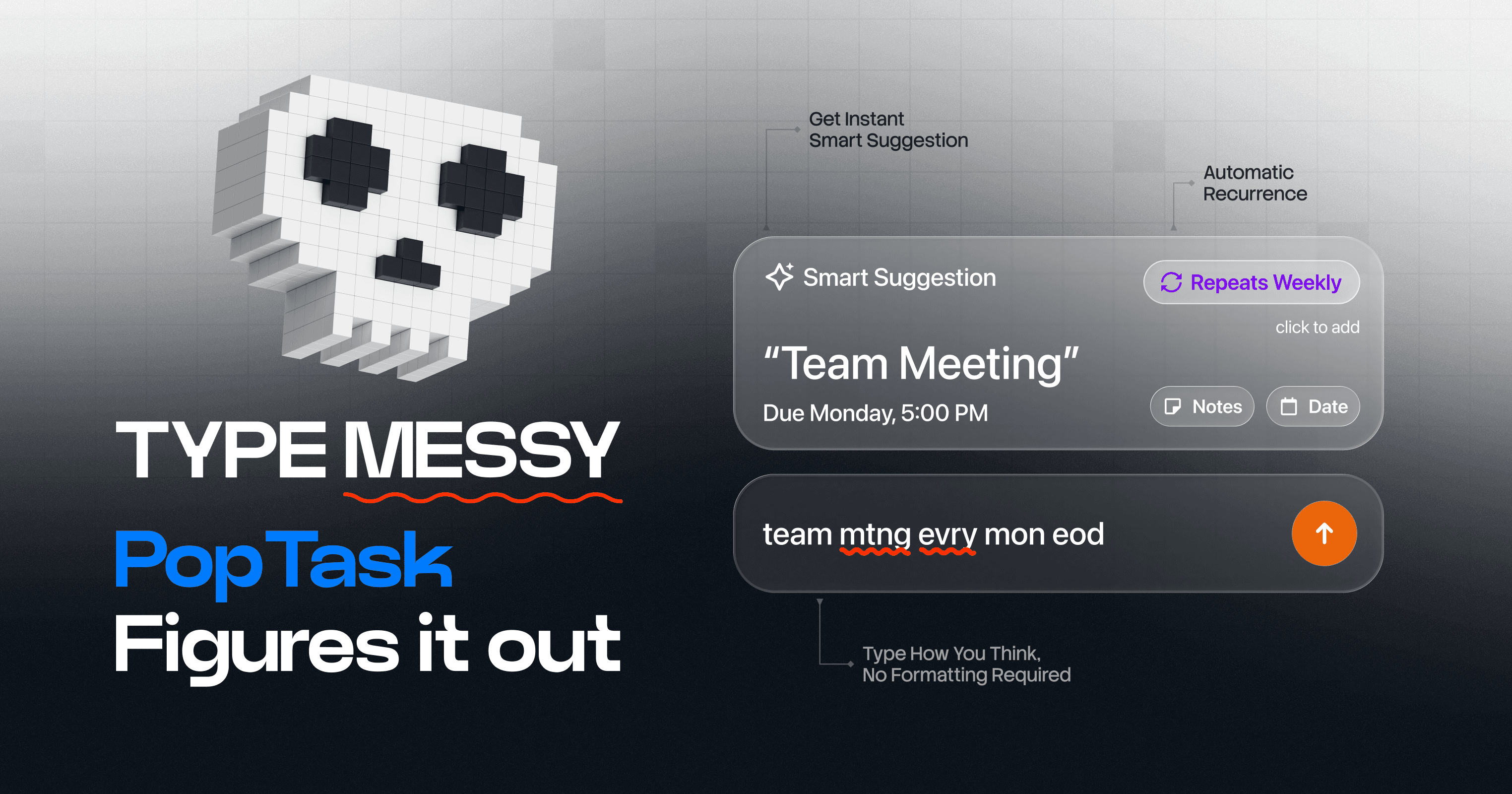
PopTask is an AI to-do list and task manager for macOS, iPhone and iPad, built and run single-handedly by Abdul Rehman Haider from Saudi Arabia. Its whole design turns on one gesture: press Command-Control-P on a Mac from whatever app you are in, or tap once on an iPhone, then write the task the way it occurred to you — “mtng wth boss in 2hr”, “gym mon wed fri 6am” — or say it out loud. The app works out the title, the date, the time and any recurring pattern, and the homepage claims about three seconds from thought to scheduled task without switching apps.
Behind that sits a four-stage pipeline: a local tokenizer, a date resolver, a title cleaner, and an AI fallback for input that is complex or in another language. On macOS 26 and iOS 26 with supported Apple Silicon, that AI runs entirely on the device through Apple's Foundation Models; on older systems the task text alone goes to the developer's cloud service and is parsed by OpenAI's gpt-4o-mini. Nothing is applied blindly — a Smart Suggestion preview shows what was understood, and you accept or edit it. The site advertises 86.3% task accuracy, sub-500ms on-device parsing and 92% offline operation, which are vendor claims rather than audited figures.
Nine interface languages are supported — English, Arabic, Chinese in both scripts, Dutch, Spanish, French, Japanese and Italian — and tasks typed in Roman Urdu or Hindi are parsed as well. Devices sync through the user's own iCloud, with two-way Apple Reminders sync, two-way Apple Calendar since version 2.3, and Google Calendar push plus read-only event import for time-blocking. Widgets, a Dynamic Island countdown, Control Center controls, Siri and Shortcuts complete the set; Microsoft Outlook and Teams are announced but not shipped.
There is no account, no third-party analytics and no advertising. The positioning is openly personal rather than collaborative — no boards, no tags — and aimed at ADHD and GTD users. Pricing is freemium: free forever for three active tasks, with Pro from $1.99 a month. The current App Store version is 2.4.2.
What it does
- Turn one line of shorthand, typed or spoken, into a task with a title, date, time and recurring pattern
- Check what was understood in a preview, then accept it or correct it before the task is created
- Capture a task without leaving the app in front of you, from a Mac keyboard shortcut or a single iPhone tap
- Break a large task into workable sub-tasks with one press of the AI button
- Push tasks to Apple Calendar or Google Calendar, and sync both ways with Apple Reminders
- Add, complete, search or snooze tasks by voice through Siri, or automate them with Shortcuts
- Set a recurring pattern in plain language to build a habit, and postpone the same way
When to use PopTask / When not to
A quick filter to help you decide if PopTask is the right fit.
When to use PopTask
- Individuals living inside the Apple ecosystem who want one capture box shared by their Mac, iPhone and iPad
- People who have abandoned heavier to-do apps and want no boards, no tags and no date pickers
- Users with ADHD, or a GTD habit, who need the friction of adding a task cut down to a few seconds
- Privacy-conscious users who would rather have no account, no analytics and AI that runs on the device
- Multilingual users who think in one of the nine interface languages, or who type in Roman Urdu or Hindi
When not to use PopTask
- Teams: there is no sharing, no assignment and no collaborative project view of any kind
- Anyone on Android, Windows or the web, since PopTask ships only for macOS, iOS, iPadOS and visionOS
- Users who need more than three open tasks without paying, as that is where the free plan stops
- Organisations whose procurement requires a data processing agreement, a named GDPR Article 27 representative or an incorporated counterparty
- People running complex projects who expect boards, tags, dependencies or a public API to build on
How to use PopTask
A typical end-to-end flow, from setup to results.
- Download PopTask from the Apple App Store; it requires macOS 14, iOS 18, iPadOS 18 or visionOS 2 at minimum
- Open it and start straight away, since there is no account to create and nothing to configure first
- On a Mac, press Command-Control-P from any application to pop the capture panel; on iPhone or iPad, tap once, or capture from the Lock Screen, Control Center or the share sheet
- Type the task in your own shorthand, abbreviations and typos included, or tap the microphone and say it
- Read the Smart Suggestion preview showing the title, date, time and recurrence it inferred, then tap to accept or edit it
- Leave iCloud sync on, or turn it off in Settings if you would rather keep tasks on one device only
- Switch on the integrations you want in Settings, as Apple Reminders, Apple Calendar and Google Calendar are all off until you enable them
- Complete the Google sign-in if you connect Google Calendar; an in-app disclosure explains the two scopes requested beforehand
- Grant the system permissions the features need: notifications, the microphone for voice, and Calendar and Reminders access
- Set your notification lead time — at the due time, or 5, 15 or 30 minutes or an hour ahead — and from then on capture by saying “Hey Siri, add a task to PopTask”
Pros & Cons
Pros
- No account to create and no personal information requested in order to use the app
- The free plan is permanent rather than a trial, and includes every feature within its three-task limit
- Pricing is unusually low: $1.99 a month, $14.99 a year, or $49.99 once for life
- On recent hardware the AI runs on the device, so the text of your tasks does not leave it
- Capture is genuinely fast and does not require leaving the application you are working in
- The privacy policy is detailed and specific about named third parties, legal bases and retention, which is rare at this scale
- Development is quick and responsive, with nine releases between early June and mid-August 2026 and documented accessibility work
Cons
- Apple only: there is no Android app, no Windows app and no web version
- The free plan stops at three active tasks, which is tight for anyone using it all day
- A single developer means no support team, and a product whose continuity rests on one person
- Nothing collaborative: no sharing, no assignment and no team view
- Fully on-device AI needs macOS 26 or iOS 26 on supported Apple Silicon; otherwise task text is sent to OpenAI
- No data processing agreement, no GDPR Article 27 representative, no published postal address and no incorporated company
- Evidence of reception is very thin, at one App Store rating and two reviews, and the 86.3% accuracy claim is unaudited
Pricing & Plans
A permanent free plan is available: PopTask may be used indefinitely, with no time limit, for up to three active tasks, and every feature is included within that ceiling. The lowest paid entry point is PopTask Pro at USD 1.99 per month, which removes the task limit. An annual subscription at USD 14.99 and a one-time lifetime purchase at USD 49.99 are also offered. All billing is handled by the Apple App Store and charged to the Apple ID. No time-limited free trial is offered, the permanent free plan serving that purpose instead.
- Free — USD 0
- permanent and non-expiring
- up to three active tasks
- with natural-language input and on-device AI included
- unlimited tasks
- voice input
- calendar sync
- Siri and Shortcuts
- and AI task breakdown
- Pro Yearly — USD 14.99 per year via the App Store
- badged Founders Deal
- equivalent to USD 1.25 a month
- all future updates included
- Lifetime Pop — USD 49.99 as a one-time purchase granting permanent access to current and future Pro features
- with no renewal
Data, GDPR & hosting
A consolidated view of how PopTask handles your data.
GDPR overview
GDPR is addressed explicitly and in concrete terms. The privacy policy, effective 8 July 2026, names the legal bases it relies on for EEA and UK users: performance of a contract for core features, and consent for optional ones such as the cloud AI fallback, the encrypted sync relay and the calendar integrations, withdrawable at any time by switching the feature off. It sets out rights of access, rectification, erasure, restriction, objection and portability, together with the right to complain to a local supervisory authority, and it documents international transfers to the United States. California CCPA and CPRA rights are covered separately. Requests go to support@poptask.bar. Two gaps remain worth noting: no Article 27 EU representative is designated, and no data processing agreement is offered or mentioned anywhere.
Who owns the data?
Under the Terms of Use you keep full ownership of every task, note and piece of content you create in PopTask; the developer states he claims no rights over that content and does not access it. Because tasks are held on your own devices and synced through your own iCloud, you are also their custodian in practice, which means backups are your responsibility and the developer disclaims liability for any loss or corruption. Ownership of the application runs the other way: its design, code, icons, name and branding belong to Abdul Rehman Haider, and you receive only a limited, non-exclusive, non-transferable and revocable licence to use it on Apple devices you own or control.
Reuse rights
You may reuse your own task data freely and without asking permission. The Terms confirm you retain full ownership, and the app lets you view, edit, export through standard system sharing, or delete anything you have created. The developer's own use is deliberately narrow: data serves only to store and display your tasks, interpret what you type or say, sync across your own devices, unlock Pro features you have bought, and drive the integrations you switch on. Advertising, marketing profiles, resale and any unrelated purpose are excluded, and so is model training: no Google user data is used to train AI or machine-learning models, and task text sent to the cloud fallback is neither logged nor retained. Reuse of the application itself is the opposite case and needs written permission, since copying, redistributing, reselling or creating derivative works is not allowed.
Data retention & training
Hosting summary
Tasks, notes, sub-tasks, lists, reminders and completion history are held locally in the app's sandboxed container on each Mac, iPhone and iPad, and shared on the same device with the widgets, Live Activity, Control Center controls and Share Extension through a private App Group. Cross-device sync runs through the user's own iCloud, in Apple's private CloudKit database, encrypted and managed by Apple; the developer states he has no access to it, and turning iCloud sync off keeps tasks purely local. Two services sit outside that arrangement: a real-time relay at api.poptask.bar, end-to-end encrypted with a key derived on the device and shared only between the user's own devices, which passes an unreadable blob and holds it for a few minutes; and a cloud AI fallback that parses task text through OpenAI's gpt-4o-mini in memory. Both are hosted in the United States and reached over HTTPS with TLS 1.2 or higher. Google OAuth tokens remain in the Apple Keychain on the device. The developer operates from Saudi Arabia, while the location of iCloud data itself is Apple's to determine. There is no server-side user database.
Things to keep in mind
Risks and trade-offs to weigh before adopting PopTask.
- On macOS or iOS older than version 26, or for complex and multilingual input, the text of your task leaves the device for OpenAI's servers; it is declared unlogged and unretained, but it does leave
- Turning on iCloud sync also turns on a relay through the developer's server in the United States. It is end-to-end encrypted and unreadable to him, but it is an extra hop, and only disabling iCloud sync stops it
- Your recourse is narrow: Saudi law and exclusive Saudi jurisdiction, liability capped at the greater of twelve months' spend or US$5, refunds only through Apple, and no postal address to write to
- GDPR is engaged in the policy but not fully equipped, with no Article 27 EU representative and no data processing agreement, which matters as soon as the tasks concern more than your own errands
- Trusting the marketing site can mislead: it still advertises version 2.3 while the App Store ships 2.4.2, and one pricing card labelled Lifetime displays the yearly price instead
- The headline figures — 86.3% accuracy, under 500ms parsing, 92% offline — are vendor claims with no published method, so treat a mis-parsed date as expected rather than exceptional and actually read the preview
- Handing your memory to a capture box has a cost of its own: the app is designed so that adding a task takes no thought, while reviewing what you added still does, and an unread list of parsed tasks can leave you feeling on top of things when you are not
Setup & Integrations
Technical difficulty
Very low. You download it from the App Store, open it and start typing: no account, no configuration and no server side. iCloud sync is on by default. The only real decisions are which integrations to enable in Settings, since Apple Reminders, Apple Calendar and Google Calendar are all off until you turn them on, and Google needs an OAuth sign-in. Expect the usual system permission prompts for notifications, the microphone and Calendar and Reminders access. Fully on-device AI requires macOS 26 or iOS 26 on supported Apple Silicon; otherwise the cloud fallback handles the harder input.
Deployment
Apps stores
Integrations
Supported languages
Behind PopTask
Resources
All the official URLs gathered for verification and reference.
Frequently asked questions
What exactly is PopTask?
Which devices and operating systems does it need?
Does the AI run on my device or in the cloud?
Which calendars and reminder apps does it sync with?
Where is my data stored, and who can read it?
Is it really free?
Which languages does it support?
Is there a minimum age?
Who is behind PopTask, and under which law?
Should you pick PopTask?
PopTask is a narrow product that does its one job well. Everything is arranged around a single gesture — a keyboard shortcut or a tap, a line of shorthand typed or spoken, and a scheduled task a few seconds later — and the natural-language parsing, shown in a preview before anything is created, is what justifies the app's existence. The privacy design is a real second argument rather than a slogan: no account, no third-party analytics, tasks held on the device and in the user's own iCloud, and AI that runs locally on recent Apple hardware.
The limits are just as clear. It is Apple-only and strictly personal, with no Android, no web and nothing for teams. It is the work of one developer, which explains both the responsiveness — nine releases in ten weeks, accessibility fixes included — and the risk, since continuity rests on one person with no support team behind him. The compliance profile is thin for anything beyond individual use: no data processing agreement, no GDPR Article 27 representative, no postal address and no incorporated company, with Saudi law and Saudi courts governing the terms. Public evidence is thin too, at a single App Store rating.
Price makes much of that easier to accept. Three active tasks are free forever, and lifting the limit costs $1.99 a month, $14.99 a year, or $49.99 once, low enough that trying it costs almost nothing. Two practical cautions before you do: on macOS or iOS older than version 26 the text of your tasks is sent to OpenAI rather than parsed locally, and the marketing site still advertises version 2.3 while the App Store ships 2.4.2, which makes the store listing the more reliable description of what you will actually install.
- Choosing a selection results in a full page refresh.
- Opens in a new window.