
ShotSolve
A free macOS menubar app that captures any part of your screen and lets you question it with GPT-4o. You supply your own OpenAI API key, create no account, and keep that key in the Apple Keychain.
What is ShotSolve?
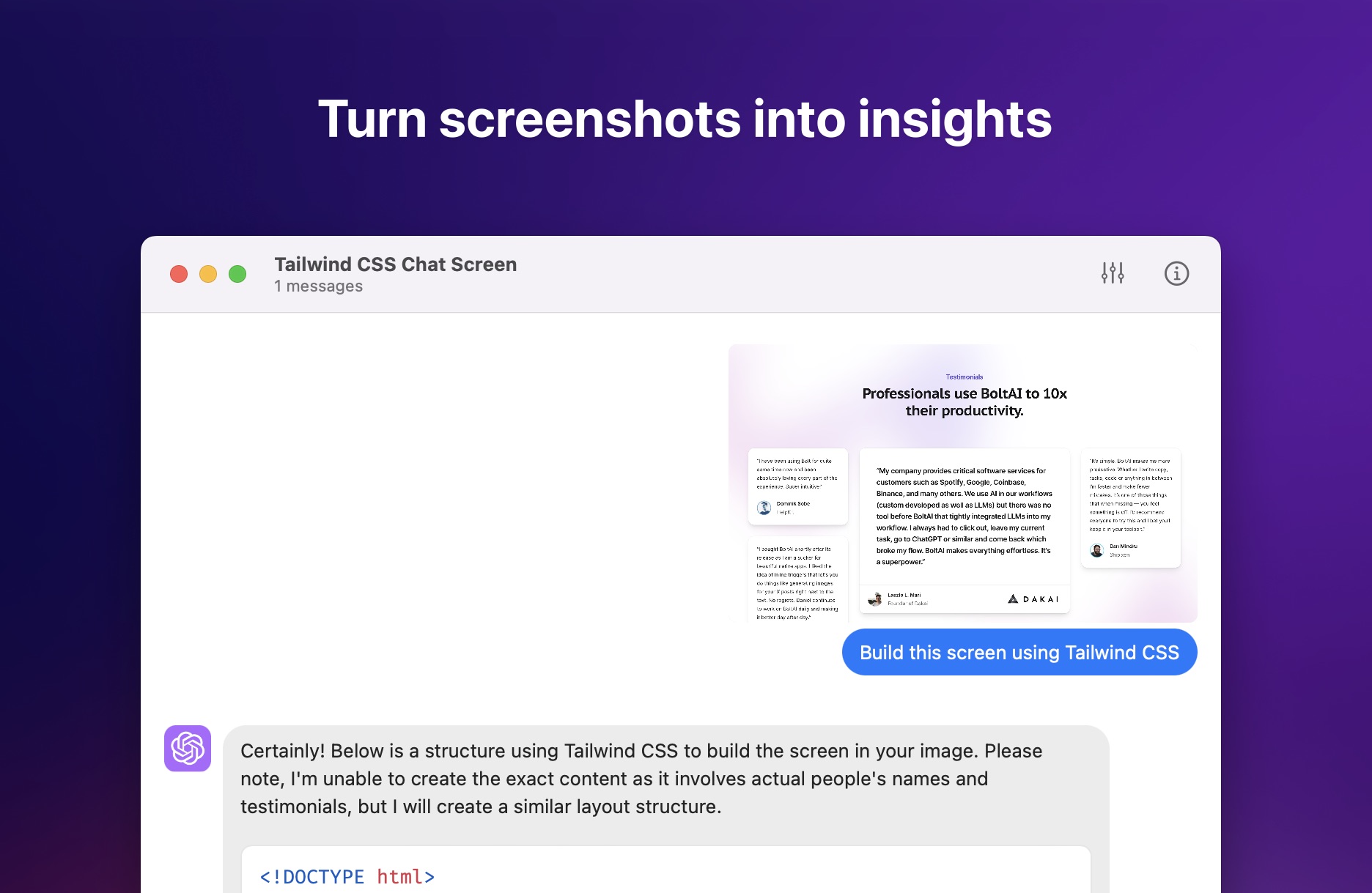
ShotSolve is a free native macOS application that lives in the menu bar and does one thing well: it turns whatever is on your screen into a question. Press Command + Shift + 1, drag over the area you care about, type what you want to know, and a vision-capable model answers. The default model has been GPT-4o since version 1.2.0; the project itself was born when OpenAI first shipped the GPT-4 Vision API.
The idea came from a customer request. Someone using the publisher's paid app wanted to generate and preview code from their Figma documents, and that use case gave the screenshot-plus-question loop its purpose. The publisher now lists six: generating code from a design, design critique, software UI/UX feedback, marketing material evaluation, contextual help inside unfamiliar software, and programming tutorial generation.
The app runs on a bring-your-own-key model. There is no ShotSolve account, no sign-up and no subscription; instead you paste your own OpenAI API key, which the app stores in the Apple Keychain. That key must belong to an OpenAI account with a valid payment method, since every answer is billed to you by OpenAI directly. A ChatGPT subscription cannot be substituted.
Despite its narrow scope, this is not a thin wrapper. It is genuinely native, described by its author as not another 500MB Electron app, with universal shortcut keys and performance tuned for Apple Silicon. The chat interface offers light and dark mode, custom fonts and line spacing, a separate font and theme for code blocks, and conversation management that lets you edit or delete messages and regenerate answers. The OpenAI settings are unusually complete for a free tool, covering a custom API host, a context limit, a custom system instruction, and temperature, presence penalty and frequency penalty. Native LaTeX rendering arrived in 1.2.0.
It requires macOS 12 or later on Intel or Apple Silicon, and ships through Gumroad rather than the Mac App Store. The publisher is BoltAI, the trading name of Podzim LLC, and presents ShotSolve openly as a demonstration of the engine behind its paid product.
What it does
- Ask a question about anything currently displayed on your screen
- Generate and preview code from a design mockup
- Get a design critique or a UI/UX review of an interface
- Run a pre-configured prompt against a fresh screenshot
- Evaluate marketing material and creative assets
- Produce a step-by-step programming tutorial from what you captured
- Get contextual help on unfamiliar software without leaving it
When to use ShotSolve / When not to
A quick filter to help you decide if ShotSolve is the right fit.
When to use ShotSolve
- Front-end and full-stack developers turning a design mockup into working code
- Product designers and UX practitioners wanting a fast second opinion on a screen
- Product managers reviewing software interfaces ahead of a release
- Marketers evaluating creative assets and landing pages on the spot
- Mac users who already hold a billable OpenAI API key and want no extra subscription
When not to use ShotSolve
- Anyone without an OpenAI API key, since a ChatGPT subscription will not work here
- Windows and Linux users, and anyone hoping for a mobile or web version
- Teams needing shared accounts, cloud sync or centralised administration
- Organisations requiring a signed DPA, GDPR documentation or a named EU representative
- People looking for a full ChatGPT workspace rather than a single screenshot shortcut
How to use ShotSolve
A typical end-to-end flow, from setup to results.
- Check that your Mac runs macOS 12 or later, on Intel or Apple Silicon
- Download ShotSolve free of charge from the publisher's Gumroad page
- Create an OpenAI API key, following the step-by-step guide the publisher links to
- Make sure the OpenAI account behind that key has a valid payment method on file
- Launch the app and paste the key, which is saved to the Apple Keychain
- Skip account creation entirely, as ShotSolve does not have one
- Press Command + Shift + 1 and select the part of the screen you want to ask about
- Type your question and let the model read the capture
- Optionally set a custom system instruction or a pre-configured prompt for repeat tasks
- Tune the context limit, API host and model parameters if the defaults do not suit you
Pros & Cons
Pros
- Completely free, with no account and no subscription
- Genuinely native and lightweight rather than an Electron shell
- Strong privacy by construction, since nothing is collected, stored or analysed
- Unusually deep OpenAI configuration for a tool that costs nothing
- Custom API host allows a proxy or a compatible third-party endpoint
- Global shortcut keeps you inside the app you were already using
- Transparent running costs, paid to OpenAI directly with no markup
Cons
- macOS 12 or later only, with no Windows, Linux, web or mobile version
- An OpenAI API key with billing enabled is mandatory, which is a real barrier
- A ChatGPT subscription cannot be used in its place
- No postal address, contact page or email address anywhere on the site
- No GDPR mention, no DPA and no subprocessor list
- The public changelog stops at version 1.2.0, after only two entries
- Distributed through Gumroad rather than the Mac App Store
Pricing & Plans
ShotSolve is offered free of charge in its entirety. There is no paid tier, no trial period and no account, so there is no lowest paid price point to quote. The only expenditure is indirect: the application relies on the user's own OpenAI API key, and OpenAI bills that usage directly according to the model and the volume consumed. The publisher's fuller product is sold separately and forms no part of this offer.
- the complete application
- with no account
- no published usage quota and no paid upgrade path inside ShotSolve itself. The only cost borne by the user is their own OpenAI API consumption
- billed by OpenAI.
Data, GDPR & hosting
A consolidated view of how ShotSolve handles your data.
GDPR overview
There is no GDPR mention on the ShotSolve site whatsoever. A dedicated search across the homepage and the privacy policy returned nothing: no compliance claim, no legal basis, no statement of data subject rights, no Article 27 representative, no DPA offer and no subprocessor list. The privacy policy invites users to contact the publisher without giving any address. Podzim LLC is a Wyoming company operating under Wyoming law; its separate policy for BoltAI does acknowledge GDPR rights, but that document covers a different product and cannot be read onto ShotSolve. The mitigation here is structural rather than documented: with no account, no backend and no collection, processing stays on the user's own Mac and at OpenAI. Anyone with a formal compliance requirement should treat this silence as a gap.
Who owns the data?
ShotSolve's privacy policy is unusually short because the app holds nothing. The publisher states that it collects, stores and shares no personal or non-personal data, and that no usage data, diagnostics or device information leaves the machine. Your OpenAI API key sits in the Apple Keychain, on your own Mac, and serves only to authenticate you with OpenAI. Content you type is neither stored nor analysed. The single exception is the request itself: screenshots and prompts travel straight to OpenAI's servers, where OpenAI's own policy governs what follows. Ownership, in practice, never leaves you.
Reuse rights
The policy grants the publisher no reuse rights at all, because it takes custody of nothing: there is no account, no server-side copy and no analytics pipeline to feed. You may use the answers ShotSolve produces as you see fit, and no clause on the site restricts what you do with that output. The meaningful limit sits downstream. Requests you send, text and image alike, are processed by OpenAI, which may store and use them to provide and improve its services under its own privacy policy and terms of use. The publisher points users there rather than substituting rules of its own.
Data retention & training
Hosting summary
ShotSolve has no hosting story of its own, because it has no backend. There is no account, no server-side database and no cloud sync; the application runs entirely on the user's Mac, and the OpenAI API key is held in the Apple Keychain on that same machine. No hosting country and no region are announced anywhere on the site, and none would apply to user content, which is never collected in the first place. The only outbound flow is the request itself: captured images and prompts go directly from the Mac to OpenAI's servers, so the effective jurisdiction for that data is OpenAI's rather than the publisher's. The marketing site is served behind Cloudflare and resolves to a United States address, but that concerns the web page, not user data. The publisher, Podzim LLC, is a Wyoming entity operating under Wyoming law.
Things to keep in mind
Risks and trade-offs to weigh before adopting ShotSolve.
- Screenshots leave your Mac: anything visible when you capture, from credentials to client data, is sent to OpenAI
- API usage is billed by OpenAI with no spending cap set by the app, so costs can climb unnoticed
- OpenAI's own retention and usage rules apply to everything you send, and the publisher does not control them
- The absence of any GDPR statement, DPA or subprocessor list makes the tool hard to justify in a regulated workplace
- With no support email or postal address on the site itself, you have little direct recourse if something goes wrong
- Leaning on instant answers for design and interface judgement can quietly erode your own critical eye
- A changelog that stops at version 1.2.0 leaves the long-term maintenance of the app an open question
Setup & Integrations
Technical difficulty
Installing the app is trivial: download it from Gumroad, open it, and skip account creation entirely. The one real hurdle sits upstream, because you must create an OpenAI API key and enable billing on that account, which is more than a casual user has usually done. The publisher links a step-by-step guide for creating the key and another for fixing billing errors. Beyond that, nothing is required. Advanced settings such as the custom API host, context limit and model parameters are optional and can be ignored.
Deployment
Integrations
Behind ShotSolve
Fundraising
Resources
All the official URLs gathered for verification and reference.
Alternatives
Tools that compete with or complement ShotSolve.
Frequently asked questions
Is ShotSolve really free?
Can I use my ChatGPT subscription instead of an API key?
Is my API key safe?
Which model answers my questions?
How do I actually use it?
What do I need to run it?
Does ShotSolve keep my data?
Where do I download it?
Who is behind ShotSolve?
Should you pick ShotSolve?
ShotSolve is a small, deliberate tool that solves one friction point: the gap between seeing something on screen and being able to ask about it. Within that scope it is well made. The app is genuinely native, the shortcut is instant, and the OpenAI configuration goes deeper than most paid utilities bother to. Because it holds nothing at all, its privacy position is stronger than any policy wording could make it.
The trade-off is the key. Bringing your own OpenAI credentials makes the app free and the costs transparent, but it also puts a real obstacle in front of anyone who has never created an API key or enabled billing on an OpenAI account. That single requirement will decide whether ShotSolve is effortless or simply out of reach.
The documentation is where the tool shows its indie origins. There is no company address, no contact email on the site, no GDPR statement, no DPA and no stated minimum age. For personal use that hardly matters; in a regulated workplace it matters a great deal, and the fact that screenshots travel to OpenAI deserves thought before capturing anything sensitive. The legal identity behind the app, Podzim LLC, has to be read off the publisher's other site rather than this one.
It is also worth remembering what ShotSolve is for. The publisher is candid that the app demonstrates the engine powering its paid product, and the changelog stops at version 1.2.0. Treat it as a sharp, free utility that does exactly what it claims, rather than a product with a roadmap. On those terms, for a Mac user who already has an API key, it costs nothing to try and earns its place in the menu bar.
- Choosing a selection results in a full page refresh.
- Opens in a new window.